How to Build a Local Business Lead List by Neighborhood Instead of Just City
Table of Contents
Building a neighborhood business lead list can make local prospecting much easier than treating an entire city as one large market. Instead of working through hundreds of businesses scattered across different areas, you can organize prospects by neighborhood, ZIP code, district, or sales territory.
Say you sell commercial cleaning services in Chicago. A city-wide list may contain hundreds of offices, clinics, restaurants, and other businesses, but it does not tell you which prospects belong to the same local area or which territory a sales rep should work first.
For local prospecting, sometimes “Chicago” is not the real territory.
The real territory might be:
The Loop → River North → West Loop → Lincoln Park
A neighborhood-based approach makes the list easier to research, assign, and work systematically.
Important note: A business appearing inside a neighborhood or ZIP code does not automatically make it a qualified lead. Geography helps organize the market. Business fit, contact information, and outreach relevance still require separate research.
Start With the City, Then Get More Specific
Use Targetron to build the initial local business dataset, export the records, and organize them into smaller geographic territories for research.
Quick Answer: How Do You Build a Local Business Lead List by Neighborhood?
- Decide whether your territory will use neighborhoods, districts, ZIP codes, or another local boundary.
- Build a master business list for the city and category you want to target.
- Export the records and organize businesses using address and geographic information where available.
- Verify businesses that sit near boundaries or operate as service-area businesses.
- Deduplicate the finished list and assign each business to one clear territory.
1. Decide What “Neighborhood” Means Before You Build the List
Do this before searching for businesses.
A neighborhood name may make sense to a local salesperson, but it may not be the cleanest way to organize data.
You could divide a city by:
- Neighborhood
- ZIP or postal code
- Business district
- Borough
- Sales territory
- Service zone
- Custom group of nearby areas
The right choice depends on what you are doing with the list.
Use Neighborhoods When the Local Market Thinks in Neighborhoods
Imagine an agency trying to find restaurants in New York.
“New York City” is probably too broad for one outreach campaign.
A more useful structure may be:
SoHo
Chelsea
Tribeca
Lower East Side
Now the agency can work one local market at a time.
Use ZIP Codes When You Need Cleaner Territory Assignment
ZIP or postal codes can be easier to put into a spreadsheet or CRM.
For example:
| Territory | ZIP Codes | Business Category |
|---|---|---|
| North | 75230, 75231 | Dental clinics |
| Central | 75201, 75202 | Dental clinics |
| East | 75214, 75218 | Dental clinics |
A sales manager can assign one territory to each rep without relying on vague neighborhood names.
The key is consistency.
If one part of your list uses neighborhoods and another uses ZIP codes, territory management gets messy very quickly.
2. Build One City-Level Master List With Targetron
Now build the business universe.
Suppose you want independent dental clinics across Dallas.
Instead of manually searching neighborhood after neighborhood and risking overlap, start by creating a broader city-level dataset.
Inside Targetron, the basic process is:
Category → Location → Relevant Filters → Search → Export
Choose the category first.
Then choose the city or town you want to research.
Additional criteria from Advanced Filters, Contact Information, and Online Presence can be used when they are relevant to the list you are building.
For example, your starting search might be:
Category: Dentist
Location: Texas
Business Status: Operational
Then run the search.
Export Before Reviewing Individual Business Data
Once the search criteria match the market you want, proceed to Download.
The export workflow is:
Download → Format → Quantity → Columns → Download Results
After the file is downloaded, review the individual business information included in the selected columns.
This gives you one master dataset that can later be divided into smaller territories.
That is usually cleaner than building five separate neighborhood lists from scratch and trying to figure out afterward whether the same company appeared more than once.
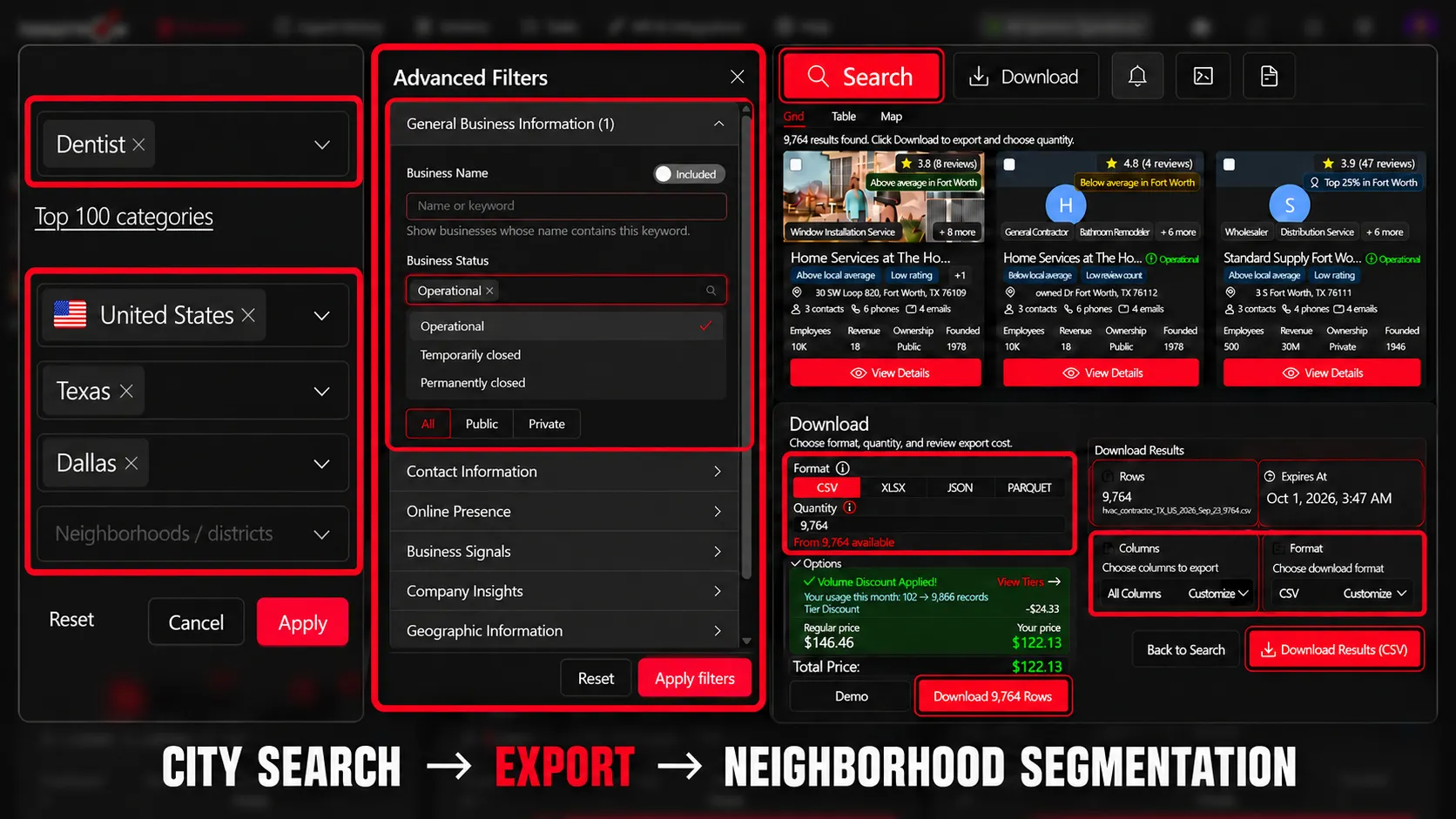
Build the Master List First
Search businesses by category and city, export the records, and use the dataset as the foundation for neighborhood-level prospecting.
3. Turn the Export Into Neighborhood-Level Segments
Now take the exported dataset and add a territory field.
You might call the column:
Neighborhood
ZIP Code
Sales Territory
or simply:
Area
Then assign businesses using the geographic information available in the exported record.
Example
Your original file might look like:
| Business | Address | City | Territory |
|---|---|---|---|
| ABC Dental | Main Street | Dallas | — |
| Bright Smile Clinic | Oak Lawn Ave | Dallas | — |
| Central Dental Group | Commerce Street | Dallas | — |
After segmentation:
| Business | Address | City | Territory |
|---|---|---|---|
| ABC Dental | Main Street | Dallas | Downtown |
| Bright Smile Clinic | Oak Lawn Ave | Dallas | Oak Lawn |
| Central Dental Group | Commerce Street | Dallas | Downtown |
Now the spreadsheet is no longer just a Dallas lead list.
It is a territory-ready Dallas lead list.
Keep the Original Geographic Data
Do not replace the original address information when adding your neighborhood field.
Keep both.
You may need the original address later for:
- Duplicate checks
- Route planning
- Territory verification
- CRM matching
- Manual business research
Your neighborhood label is an organizational layer on top of the business record.
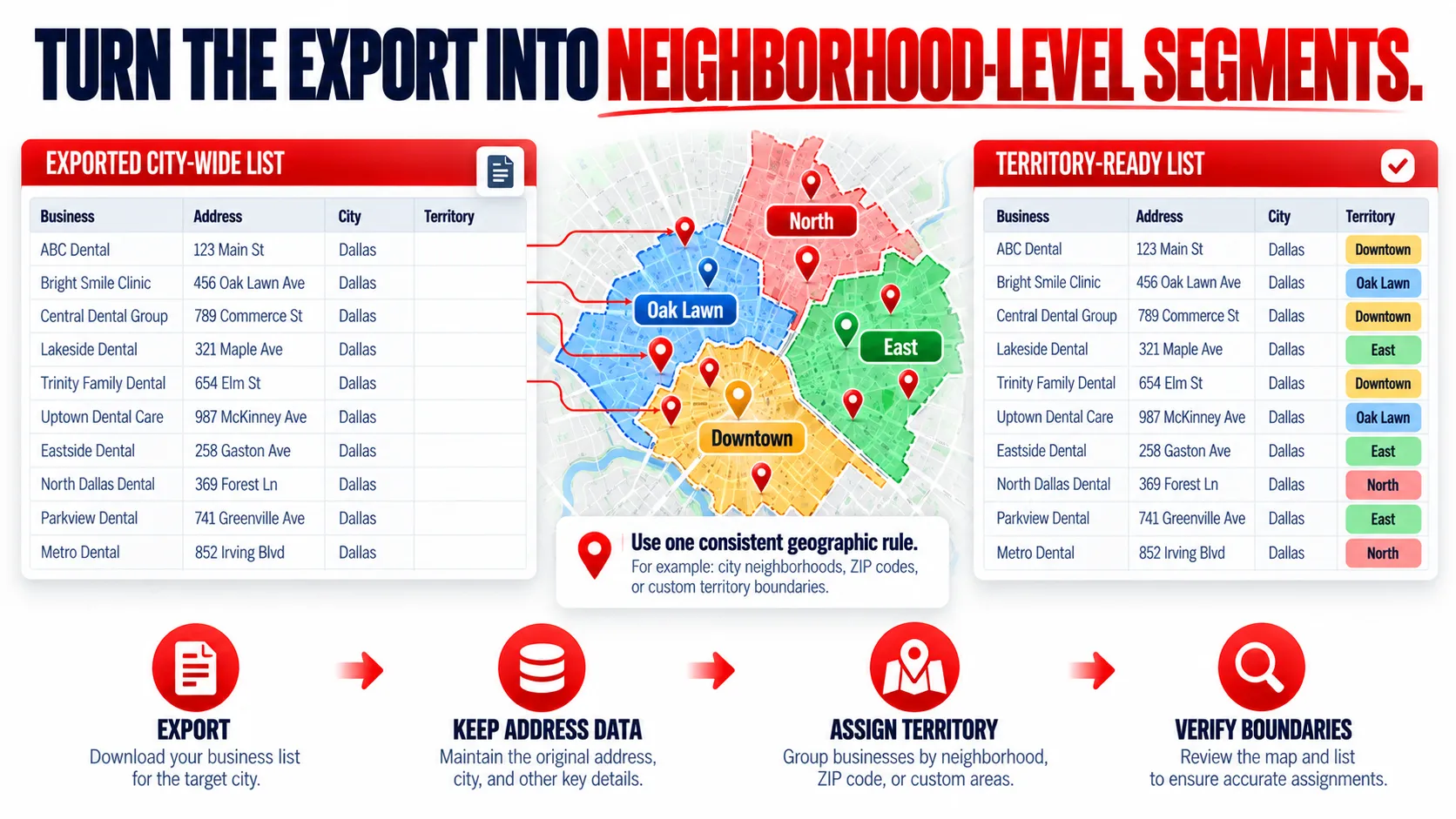
Be Careful Around Boundaries
Neighborhood boundaries are not always clean.
One business may sit on a street that locals consider part of one neighborhood while a mapping tool classifies it differently.
That is why a good territory system needs a rule.
For example:
If the business address falls inside ZIP 75201, assign it to Central Territory regardless of informal neighborhood name.
A simple rule prevents different team members from classifying the same business differently.
4. Treat Service-Area Businesses Differently
This is an important exception.
Not every local business operates from a public storefront.
Plumbers, cleaners, electricians, roofers, landscapers, and other service businesses may travel to the customer instead.
Google distinguishes these as service-area businesses and allows businesses to define areas they serve using cities, postal codes, or other geographic areas. Some service-area businesses may also hide their physical address from customers.
Physical Location and Service Territory Are Different Questions
Suppose you are building a list of plumbers serving Brooklyn.
A plumber could physically operate from one area while serving customers across several neighborhoods.
So ask yourself what you actually care about:
Where is the company based?
or:
Where can the company serve customers?
Those are not always the same thing.
Example
Imagine:
Business: ABC Plumbing
Public Address: Not displayed
Listed Service Areas: Brooklyn, Queens
Your Territory: Williamsburg
You should not automatically label the business “Williamsburg” simply because it appears when researching plumbers serving that area.
If physical business location matters, verify it separately.
If service coverage matters, create a separate column:
Service Territory
That could give you:
| Business | Physical Area | Service Territory |
|---|---|---|
| ABC Plumbing | Needs verification | Brooklyn + Queens |
This small distinction matters because Google Business Profile distinguishes between a business’s physical address and the service areas it covers, which helps prevent a neighborhood list from appearing more precise than the available data actually supports.
5. Qualify Leads Inside Each Neighborhood
Once your list is segmented, start qualifying within each territory.
Do not immediately send outreach to every business in the file.
For each record, ask:
Is this the type of business we actually want?
Is it really inside the territory we are working?
Do we have enough contact information to continue?
Is there a useful reason to research this company further?
Example: Web Design Agency
Imagine a web design agency working one neighborhood at a time.
Their file might become:
Territory: Downtown Austin
Category: Restaurants
Businesses: 84
Website information available: Review individually
Contact information: Verify before outreach
The team can now research those 84 businesses instead of jumping around the entire Austin market.
Add Only the Fields You Need
A neighborhood prospecting sheet might include:
- Business
- Category
- Address
- Neighborhood
- ZIP/postal code
- Website
- Phone
- Email where available
- Research status
- Assigned rep
- Notes
If contact information needs further checking, use a separate verification step before outreach.
Targetron’s guide to verifying B2B contact information can help with that process.
Use Simple Research Statuses
You do not need a complicated scoring model.
Try:
Not Reviewed
Researching
Relevant
Not a Fit
Contact Verified
Ready for Outreach
Now everyone working the list can see what has already been done.
6. Deduplicate Before Assigning the Territories
This step becomes especially important when neighborhoods sit close together.
The same business may appear under:
- Multiple locations
- Slightly different business names
- Different neighborhood searches
- Separate storefronts
- Different phone numbers
- The same company domain
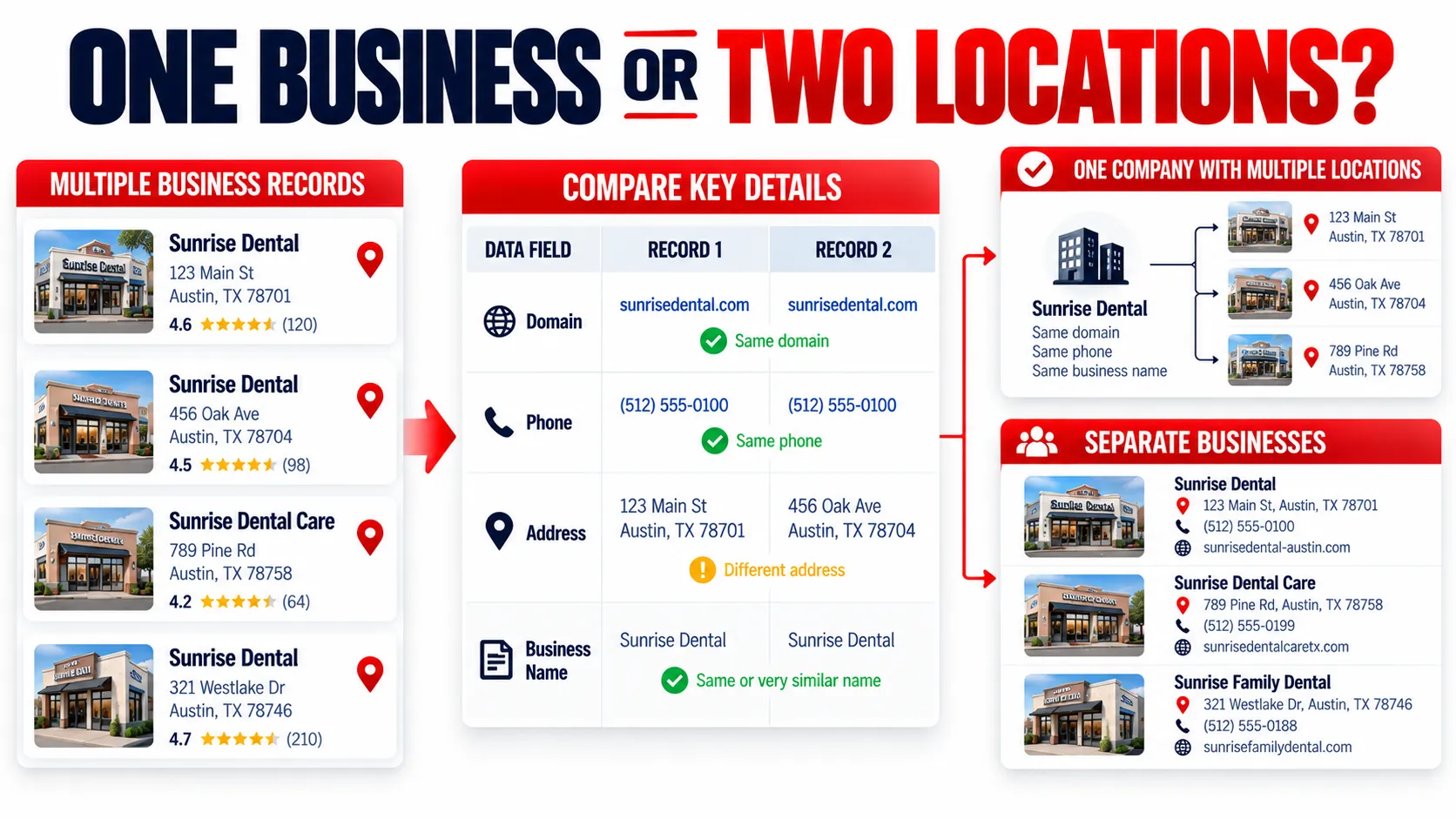
You need to determine whether you are looking at:
one company
or:
multiple real locations belonging to the same company
Check More Than the Business Name
Names alone are not enough.
Compare:
- Website domain
- Phone
- Address
- Business name
- Location
- Parent company when known
For example:
Bright Dental – Downtown
and
Bright Dental – Uptown
might be two separate locations of the same company.
If your sales team sells at the company level, you may want one account with two locations.
If your offer is sold separately to each physical location, keeping both records may make more sense.
That decision should happen before assigning the leads.
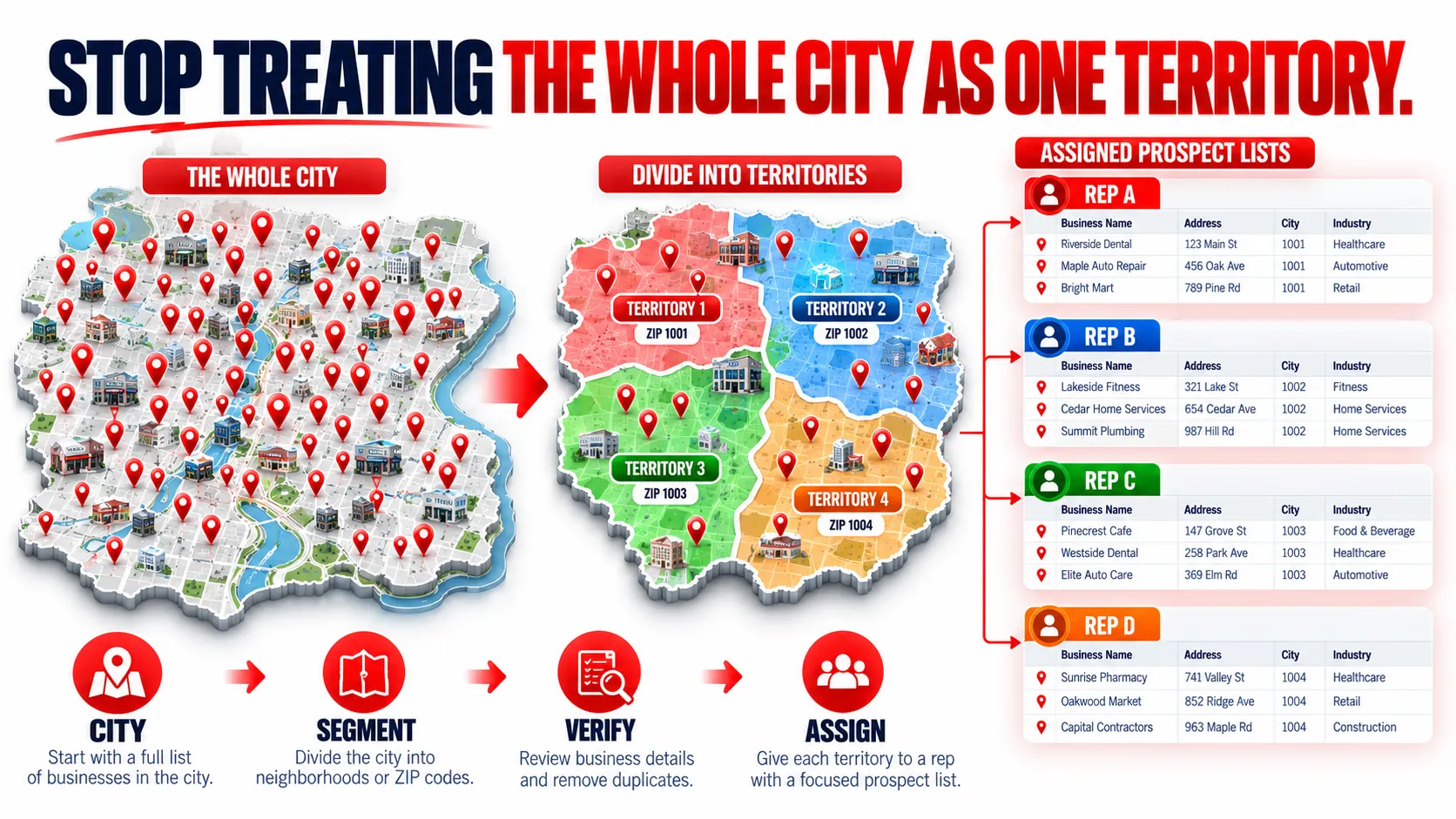
Give Every Business One Clear Territory Owner
Once duplicates are resolved, assign the list.
For example:
Rep A → Downtown
Rep B → North Side
Rep C → West Side
Each business should have one clear owner.
That prevents two people from contacting the same account because it sits close to a territory boundary.
Track Coverage, Not Just List Size
Instead of asking:
“How many leads did we export?”
ask:
“How much of this neighborhood have we actually researched?”
For example:
Downtown
120 businesses exported
82 reviewed
51 relevant
39 contacts verified
24 ready for outreach
That gives you a much clearer picture of what has happened inside the territory.
And once one neighborhood is finished, move to the next.
You end up building the city systematically:
Neighborhood 1 → Neighborhood 2 → Neighborhood 3 → Full City Coverage
rather than repeatedly buying or exporting another random city-wide list.
Neighborhood Prospecting Image
Dedupe Image
Turn One Big City List Into Smaller, Workable Territories
Build the city-level business dataset with Targetron, export it, and organize the businesses into the neighborhoods or sales territories your team actually works.
FAQ
Most frequent questions and answers
It depends on the campaign. Neighborhood or territory segmentation is useful when location affects sales coverage, field visits, service areas, or account ownership.
Use whichever gives your team the clearest and most consistent boundary. ZIP or postal codes are often easier to store and assign, while neighborhood names may better match how a local market is actually discussed.
Targetron can be used to build the initial business dataset by category and location. For neighborhood-level segmentation, use the geographic information in the exported data where available and verify the territory separately when needed.
Treat it carefully. Service-area businesses may serve an area without publicly displaying the location they operate from, so physical location and service coverage may need separate verification.
Compare business name, domain, phone, address, and location information before assigning the record.
That depends on how your sales process works. If purchasing decisions happen at the company level, consolidate the locations under one account. If each location buys independently, keeping location-level records may be useful.
Move to the next territory using the same process. Over time, the separate neighborhood lists can become a structured city-wide prospect database.
 Written by
Dan Dades
Written by
Dan Dades