Arrange a Free Consultation.
Get Free Expert Advice
Chat with Paul via WhatsApp now! Get a chance to receive free leads instantly.
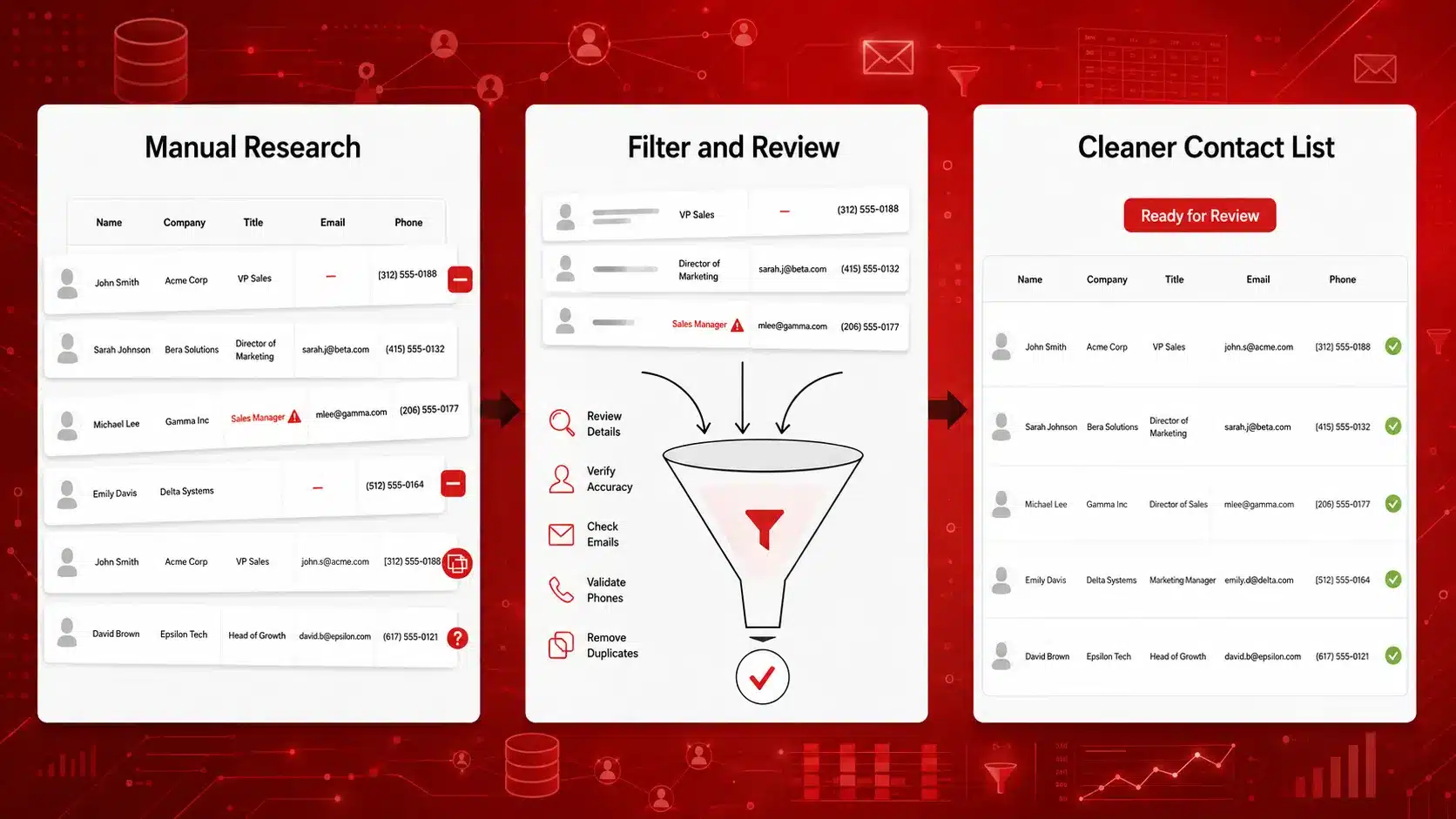
A B2B contact list can look complete and still contain former employees, outdated job titles, invalid email addresses, or phone numbers that no longer reach the right person. When these records enter a campaign, sales teams waste time, messages bounce, personalization becomes inaccurate, and CRM data becomes harder to manage.
To verify B2B contact information before outreach, confirm that the company is still active, check that the contact still works there, review the person’s current role, and check the available email and phone details. These steps help remove outdated or conflicting records before they affect the campaign.
This guide explains how to check B2B contact records manually, prepare larger lists for verification, and use Targetron to filter businesses, review contact information, check email addresses, and export a cleaner list for outreach. For the broader process of finding, filtering, and preparing prospects, read our guide to building a B2B lead generation process.
To verify B2B contact information before outreach:
These checks help prevent outdated or conflicting contact records from entering an active outreach campaign.
A B2B contact record can become outdated even when the company is still active. Employees leave, change roles, move to another department, or start using a different email address. Companies may also change domains, phone numbers, locations, or business status.
This is why a list that was accurate when it was created may no longer be ready for outreach.
Incorrect records can lead to:
A hard bounce is a permanent delivery failure, usually caused by an invalid address or domain. A soft bounce is normally temporary, such as a full inbox or unavailable mail server.
When several of these problems appear in one campaign, the team may blame the message or offer even though the contact list is the main issue.
Verification should cover the company, the person, the contact channels, and the history of the record.
| Record Area | Fields to Check |
|---|---|
| Company | Business name, operating status, website, domain, location, and business category |
| Contact | Full name, current employer, job title, department, and relevance to the offer |
| Communication | Email address, email verification result, phone number, and direct line or company switchboard |
| Record History | Data source, last-checked date, verification status, and reason for holding or removing the record |
A contact can be accurate but still be a poor fit for the campaign. Verification checks whether the information is current and usable. Lead qualification checks whether the company and person match the target market. Both should happen before a record is marked ready for outreach.
Before checking every contact field, confirm that the businesses and roles match your ICP so your team does not spend time reviewing poor-fit records.
Manual verification works best when you are checking a small list, reviewing uncertain records, or confirming a high-priority contact before outreach. The goal is to compare the record with recent public sources and identify any conflicting information.
Check the company before spending time on the individual contact.
Start with the company website and a current business listing. Compare the business name, website, location, phone number, and operating status with the information in your lead list.
Next, check whether the contact still works for the company. Useful sources include:
When a suitable company has no usable contact details, this guide explains how to find emails and contact data for local companies before starting verification.
Look for signs that the person’s employer, job title, or department has changed. A contact may still work for the company but no longer handle decisions related to your offer.
Manual checks can confirm that the company and contact appear current. They do not prove that every email address or phone number is usable.
Start by confirming that the email domain matches the company’s current website. Be cautious when the lead list uses an old domain, a different company name, or a free email provider instead of a company address.
You can also:
An MX record shows whether the domain is set up to receive email. It does not confirm that a specific mailbox exists or that the address is safe to use.
Do not treat a guessed email pattern as a verified address. It should still be checked before being added to an active campaign.
Compare the phone number in your lead list with the company website, public business listings, contact pages, and recent search results.
Check whether the number is:
A listed company number may confirm that the business can still be reached, but it does not mean the number belongs to the intended contact.
When public sources disagree, mark the record as Needs Review instead of choosing the most convenient result. Record the source you checked and the date of the review so another team member can see how the decision was made.
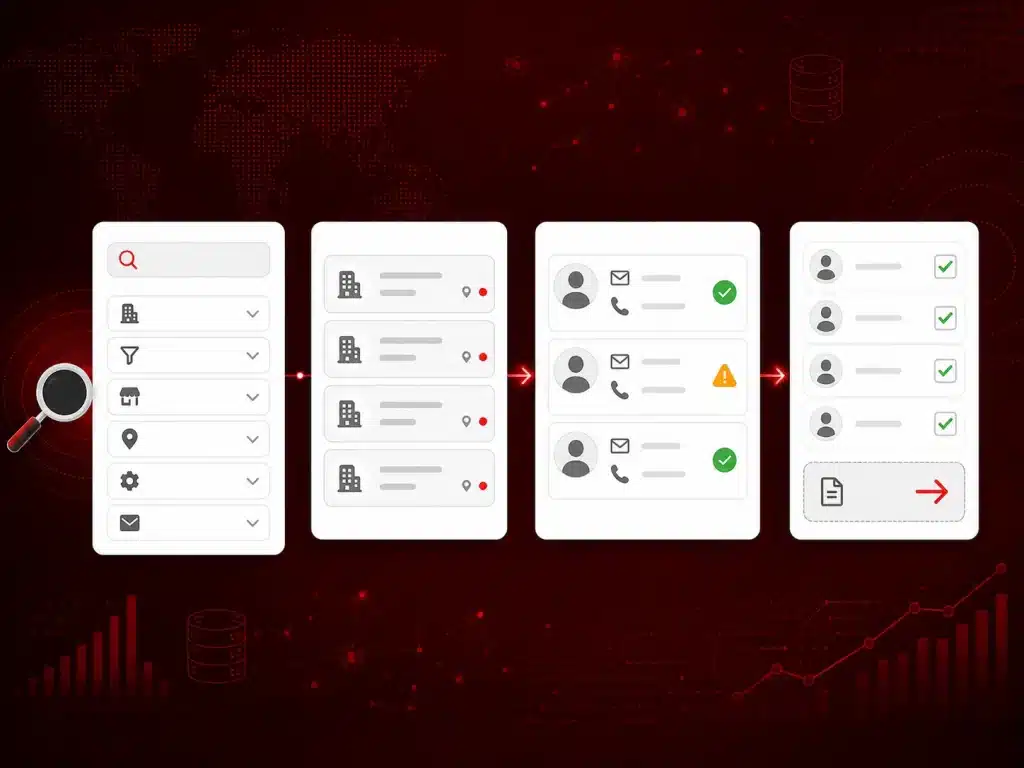
Use Targetron to narrow businesses by category, location, operating status, and contact availability before spending time reviewing individual records.
Manual checks work for a small number of contacts, but they become slow when a campaign contains hundreds or thousands of records. Targetron brings business discovery, filtering, contact enrichment, and email verification into one workflow so teams can prepare a cleaner list before outreach.
Verification should begin after poor-fit businesses have been removed.
Use Targetron’s filters to narrow the list based on the needs of the campaign, such as:
For example, an agency looking for local obstetricians and gynecologists should first remove businesses outside the required city, category, or operating status. This prevents the team from spending time checking contacts they would not approach.
For a closer look at narrowing a business search, read the guide on using Targetron’s advanced filters.
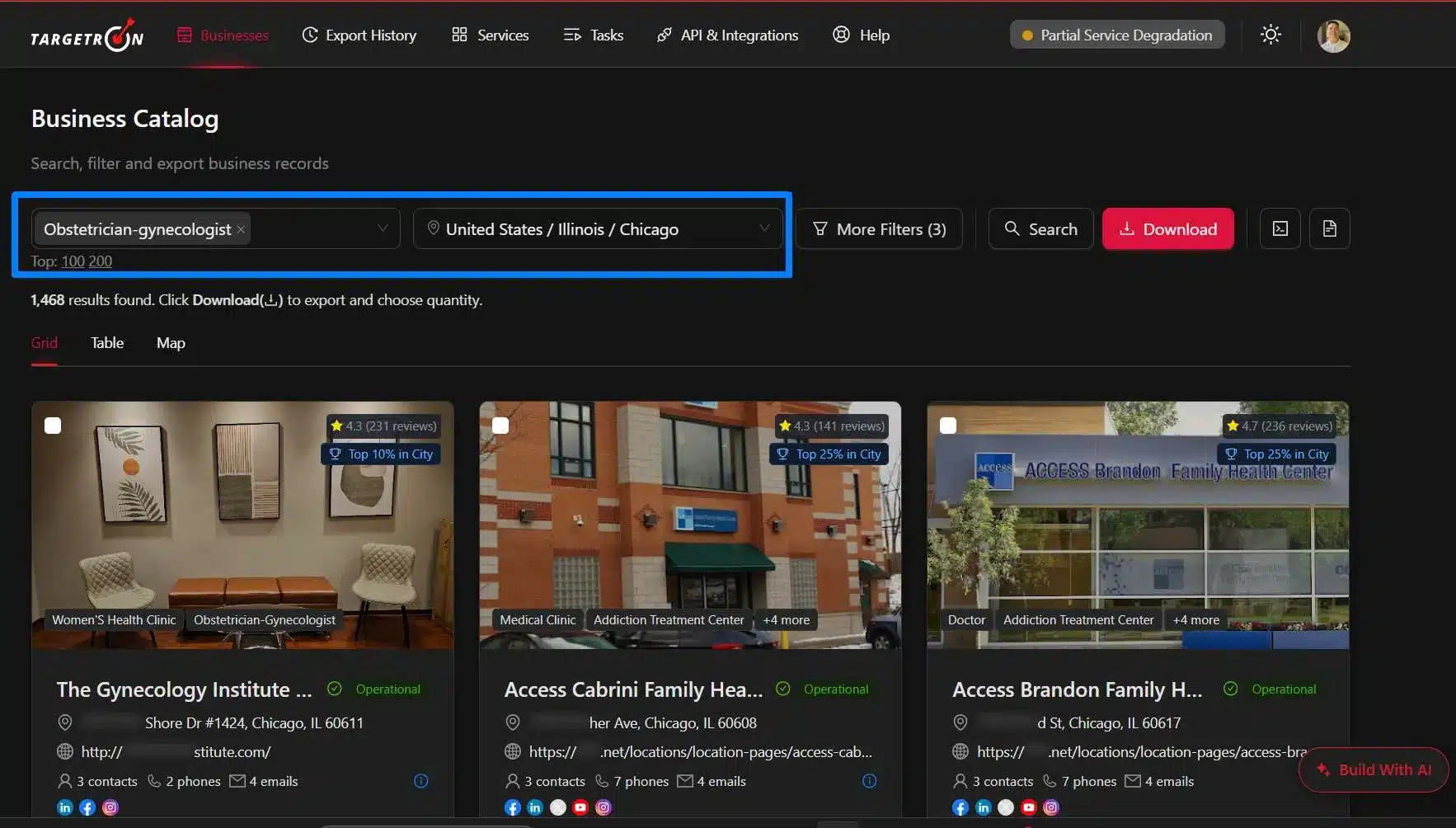
After filtering the list, review the available business details before checking the contact.
Look at:
This step helps identify records with missing, outdated, or conflicting information. It also confirms that the business still matches the campaign before more data is added.
Some businesses may match the target market but lack a usable contact or enough company details for outreach.
Contact enrichment can help when:
Enrichment adds missing information to a record. It does not automatically mean that every returned field is current or ready for outreach. The added details should still be reviewed before the record moves into an active campaign.
Once the list contains the right businesses and contact details, check the available email addresses.
A simple process is:
Export the available business and contact fields from Targetron. After downloading the list, add a data source, last-checked date, and outreach status in your CRM or spreadsheet so the team can track each review decision.
Useful fields include:
Mark each record as Ready for Outreach, Needs Review, or Remove before adding the list to a CRM or email campaign. When the records are ready, follow the Targetron export guide to download the selected business and contact fields without getting stuck.
This workflow can reduce the need to move between separate discovery, contact-data, and verification tools. It also creates a clearer record of which contacts were checked before outreach.
Contact verification works best when every record follows the same process. A fixed workflow helps sales teams decide which contacts are ready, which need more checking, and which should be removed before a campaign starts.
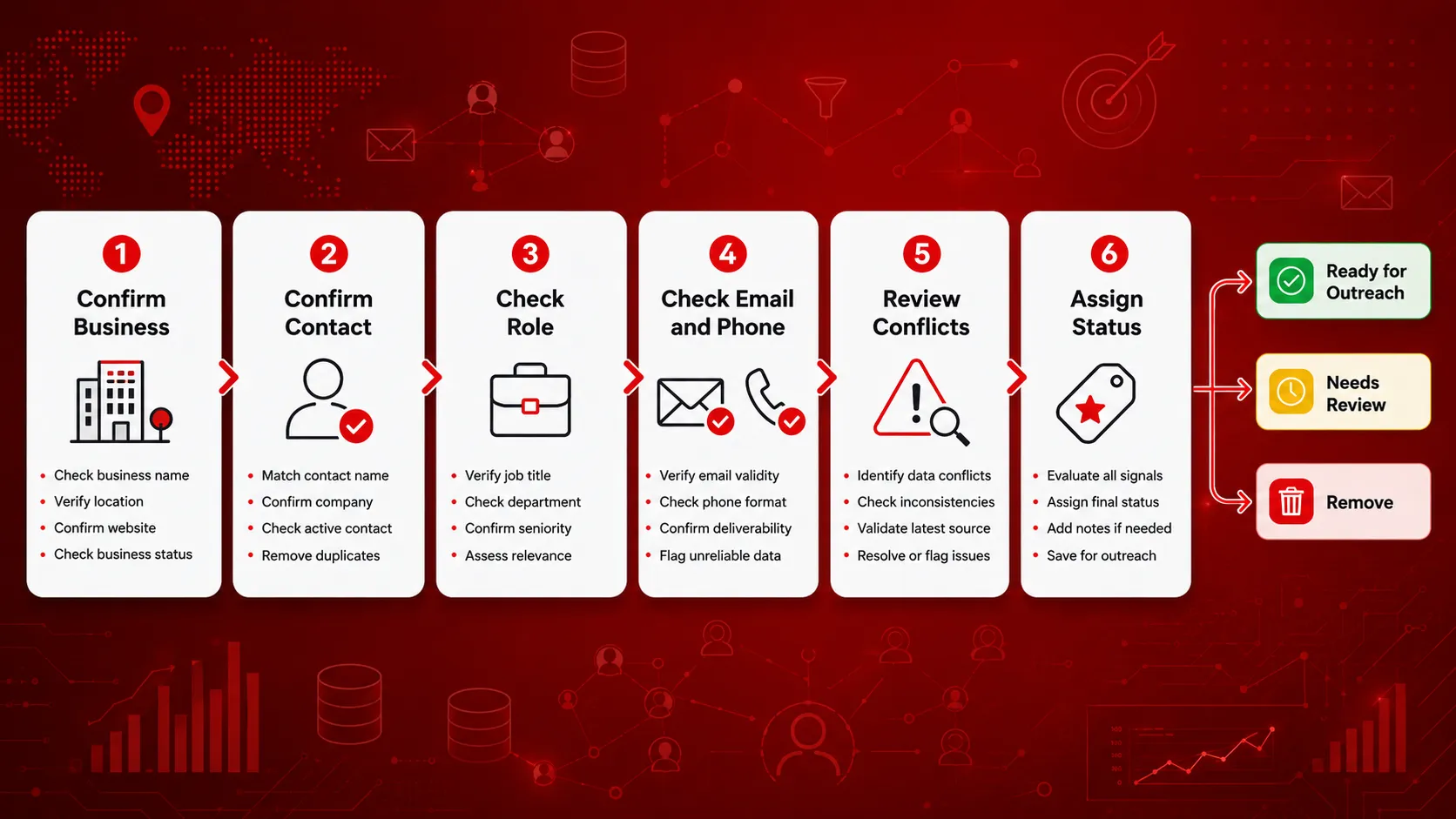
Not every record will have a clear result. Use the table below to decide what happens next.
| Situation | Recommended Action |
|---|---|
| The company is closed | Remove the record from active outreach. |
| The contact left the company | Find the person who currently holds the relevant role. |
| The email address is invalid | Search for another contact or a different email address. |
| The email result is uncertain | Hold the record for manual review before adding it to a campaign. |
| The phone number reaches a switchboard | Label it as a company number rather than a direct contact number. |
| Public sources show different information | Keep the record out of the campaign until the conflicting details are reviewed. |
| The company fits, but no contact is available | Add more contact data or research the record before outreach. |
Do not choose an email address or job title simply because it is the easiest result to use. Conflicting records should stay out of an active campaign until the difference is resolved.
Use three contact status labels: Ready for Outreach for approved records, Needs Review for missing or conflicting information, and Remove for closed businesses, invalid contacts, or poor-fit records.
Contact data should be checked again when:
There is no single recheck schedule that works for every list. The right timing depends on the age of the data, the value of the campaign, and the number of changes found during previous reviews.
Before adding contacts to a campaign:
Export only the contacts approved for the campaign.
After preparing the contact list, review these cold email campaign practices before moving the approved records into an outreach sequence.
Contact verification checks whether a record appears current and usable. It does not mean the contact has agreed to receive outreach.
Before starting a campaign:
Do not add opted-out contacts back into future campaigns. This section provides general information only and is not legal advice. Review the applicable rules or consult your legal team before launching the campaign.
Track a few practical metrics across campaigns:
A drop in invalid addresses and hard bounces may show that the verification process is helping. However, replies and meetings also depend on the target audience, offer, message, and campaign timing.
Most frequent questions and answers
Check contact information before using an older list, after a hard bounce, or when the company or contact appears to have changed. High-priority contacts may need more frequent checks than broad prospect lists.
Yes. Email verification services can check the address format, domain, mail server, and other signals without sending a normal outreach email. No single check can guarantee that the person will receive or respond to the message.
Contact enrichment adds missing information, such as a job title, phone number, or email address. Verification checks whether the information already in the record appears current and usable.
Catch-all results carry more uncertainty because the mail server may accept messages without confirming that the individual inbox exists. Keep these addresses separate from confirmed contacts and review them before use.
No. Verification checks data accuracy. Consent, opt-out requests, and the legal basis for contacting someone are separate matters.
A checked record should include the current company, contact name, role, email or phone details, verification result, data source, and last-checked date. It should also show whether the contact is ready for outreach or needs more review.
