How Local SEO Agencies Find Low-Rated Businesses With Website Information

Table of Contents

Important Note: A lower rating, available website information, or operational business status does not prove that a business needs SEO, has buying intent, or is interested in outreach. These signals should be treated as research criteria. Any listed website should be reviewed separately before drawing conclusions about the business or its online presence.

Local SEO prospect research becomes harder when agencies start with a huge market and review businesses without clear criteria.

Instead of assuming that every low-rated business represents an opportunity, agencies can use ratings, review counts, location, category, business status, and available website information to narrow the businesses they want to investigate.

Targetron can support the discovery stage by helping agencies search available business records using criteria relevant to their campaigns. 

Quick Answer: How Can Local SEO Agencies Research Low-Rated Businesses?

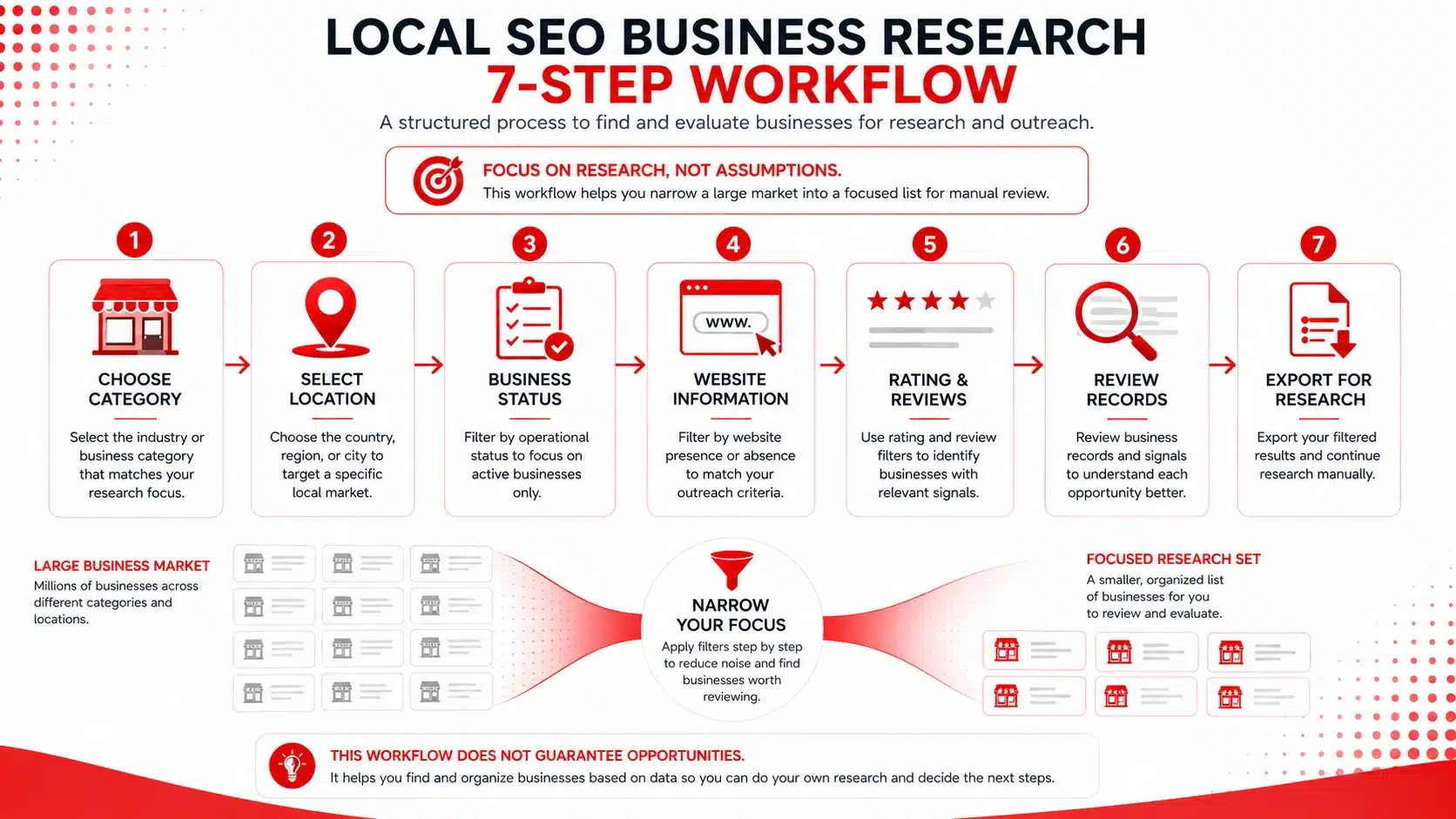
  1. Choose the business category you want to research.
  2. Narrow the search by country, city, or town.
  3. Select an appropriate business status.
  4. Filter for records with website information.
  5. Set rating and review criteria.
  6. Search and manually review the returned businesses.
  7. Export relevant records for further research.

The purpose is to create a focused research list, not automatically identify businesses that need SEO.

Seven-step local SEO research workflow showing category, location, business status, website information, ratings and reviews, record review, and export.
Narrow a local market using research criteria, then review individual businesses before deciding whether they are relevant.

1. Why Low Ratings and Website Information Are Worth Reviewing

A lower rating combined with available website information can provide a useful starting point for local business research.

Neither signal proves that a company needs SEO.

Ratings provide information about customer experiences, while a listed website gives an agency another source it can investigate.

A safer research framework is:

Lower rating + website information + operational business → research further

The important part is research further.

A lower rating does not establish that SEO is responsible for the business’s customer feedback. Reviews can relate to service, pricing, wait times, product quality, staff interactions, or other aspects of the customer experience.

Google’s guidance on customer reviews provides additional context on how businesses can approach positive and negative feedback.

Website information also requires verification. A website URL appearing in a business record does not prove that the website is currently accessible, maintained, optimized, or relevant to an SEO campaign. 

Look Beyond the Star Rating

Consider the surrounding information:

  • Average rating
  • Number of reviews
  • Recent review activity
  • Business status
  • Website information
  • Business category
  • Location

For example, a 3.8 rating from 200 reviews provides different research context from a 3.8 rating based on five reviews.

The objective is not to label a business as an SEO opportunity. It is to determine whether the record deserves additional research. 

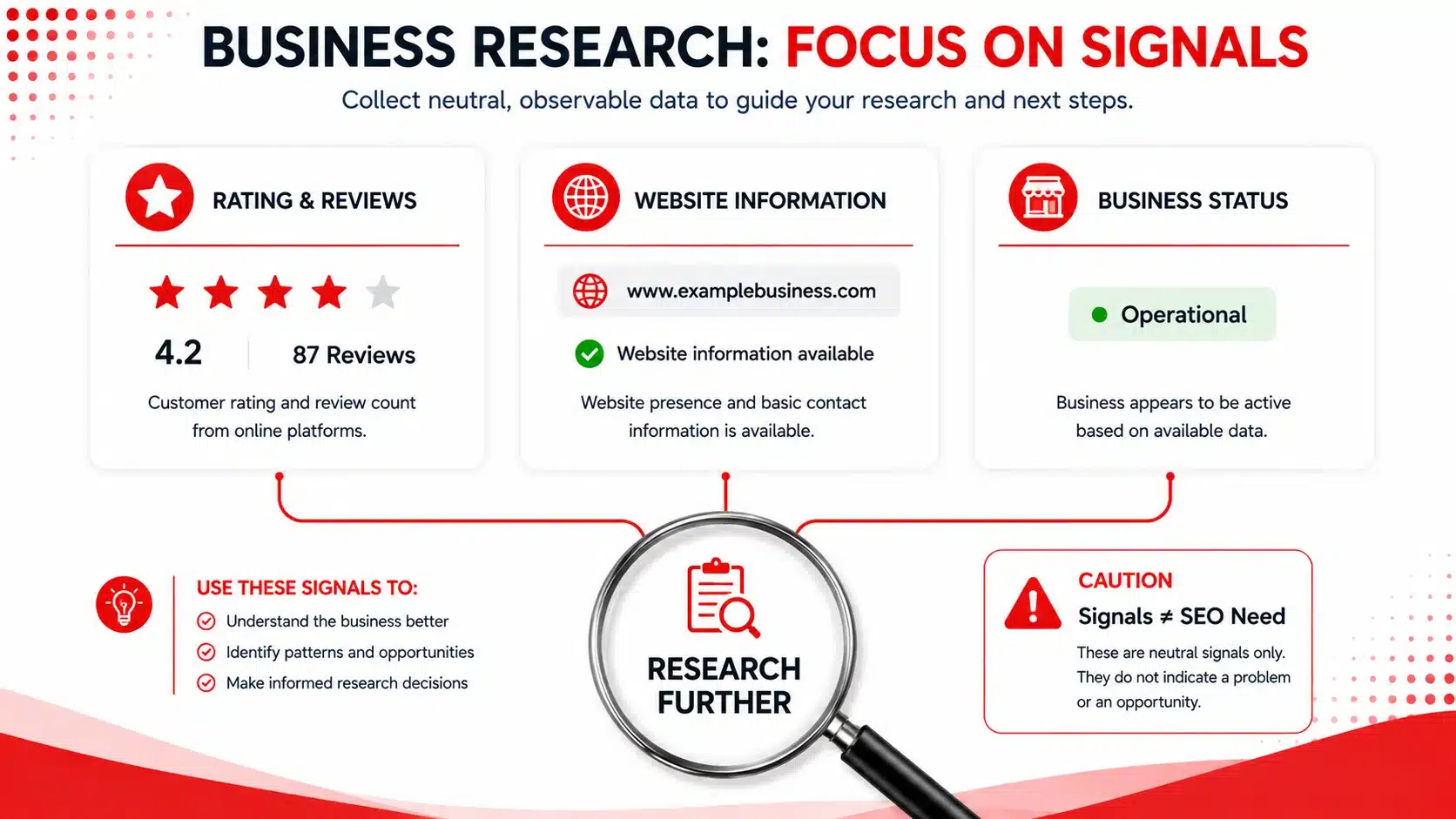
Local SEO research infographic showing ratings, website information, and operational status leading to further business research.
Ratings, website information, and business status can narrow research, but they do not establish that a business needs SEO.

2. Define Your Local SEO Research Criteria First

Before searching thousands of businesses, decide what your campaign actually needs to investigate.

A broad search for low-rated businesses can include unrelated industries, locations, and business situations.

Start with criteria such as:

  • Business category
  • Geographic market
  • Rating range
  • Review range
  • Business status
  • Website information requirements

An agency researching dentists in one city may use very different criteria from an agency researching restaurants across several locations.

These filters are research criteria—not proof of qualification.

If you need a more structured way to define the businesses you want to investigate, Targetron’s guide on finding B2B leads that match your ICP provides another framework for narrowing a broader market. 

Separate Discovery From Qualification

Keep the workflow simple:

Discover → Research → Verify → Qualify → Decide on Outreach

Targetron can support business discovery and research.

Your agency still decides whether the company fits your service and whether further research or outreach is appropriate. 

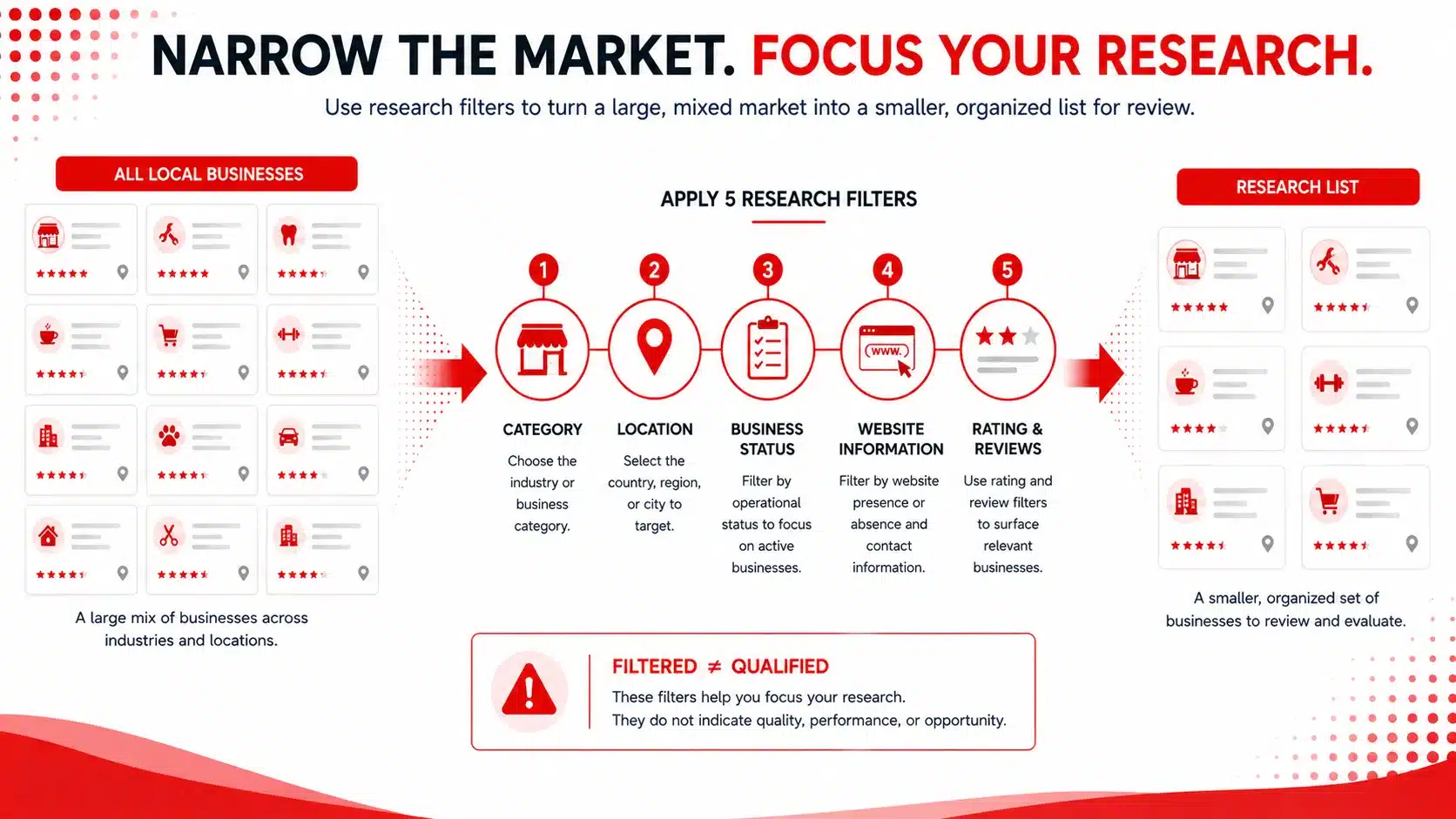
Local business research funnel narrowing business records by category, location, status, website information, ratings, and reviews.
Define research criteria before searching so you can reduce a broad market into a more manageable research list.

3. Find Low-Rated Businesses With Website Information Using Targetron

Once your criteria are defined, Targetron’s Business Catalog can be used to narrow the available records.

The workflow is:

Category → Location → Business Status → Website → Rating & Reviews → Search → Review → Export

This section should use real Targetron screenshots, not AI-generated recreations. 

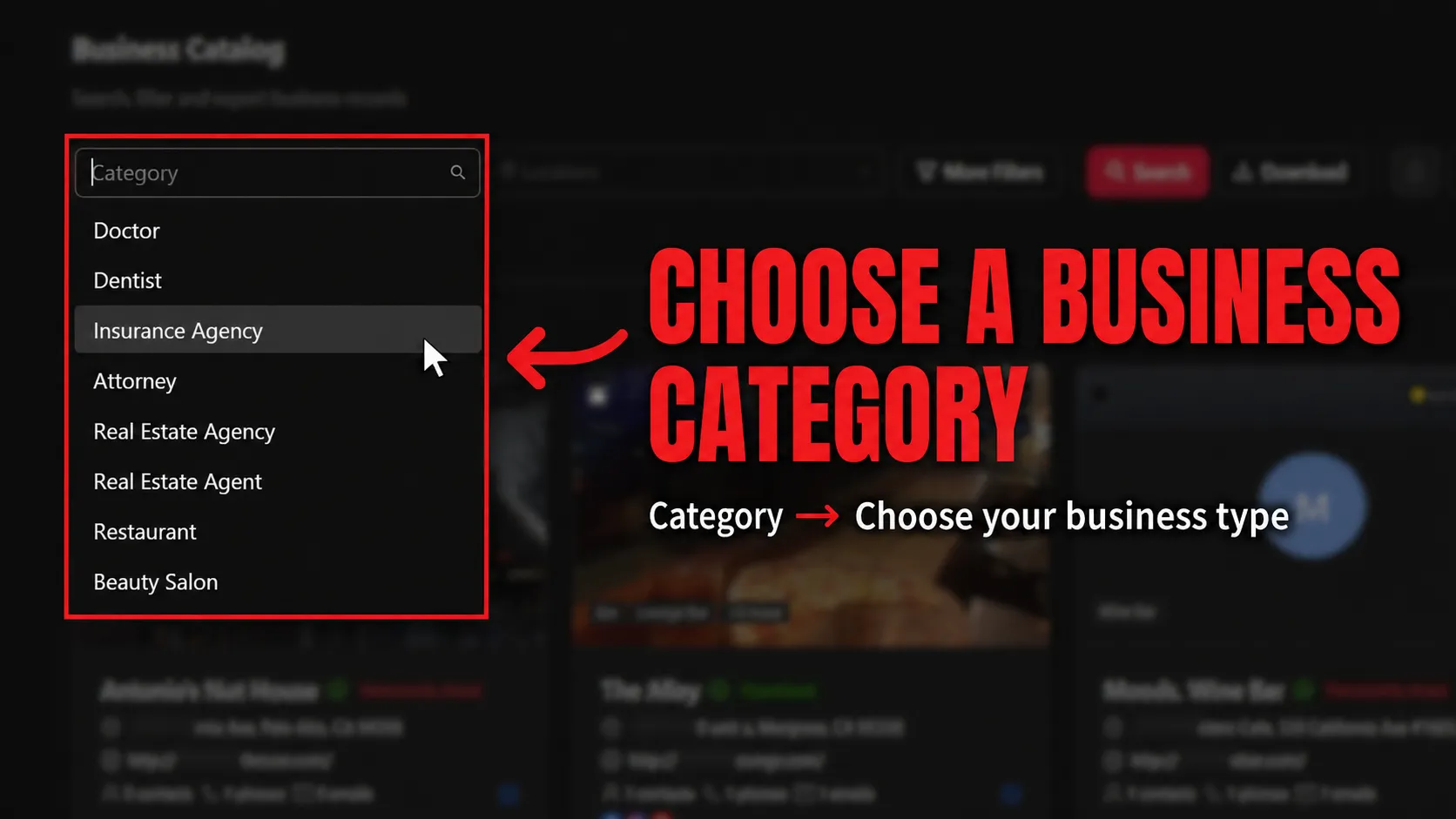
Step 1: Choose a Business Category

Start with the type of business your agency wants to research.

Selecting a focused category helps keep the returned records relevant to the market being investigated. 

Targetron Business Catalog category dropdown showing business types available for local SEO research.
Start by choosing the business category relevant to your research campaign.

Step 2: Select the Target Location

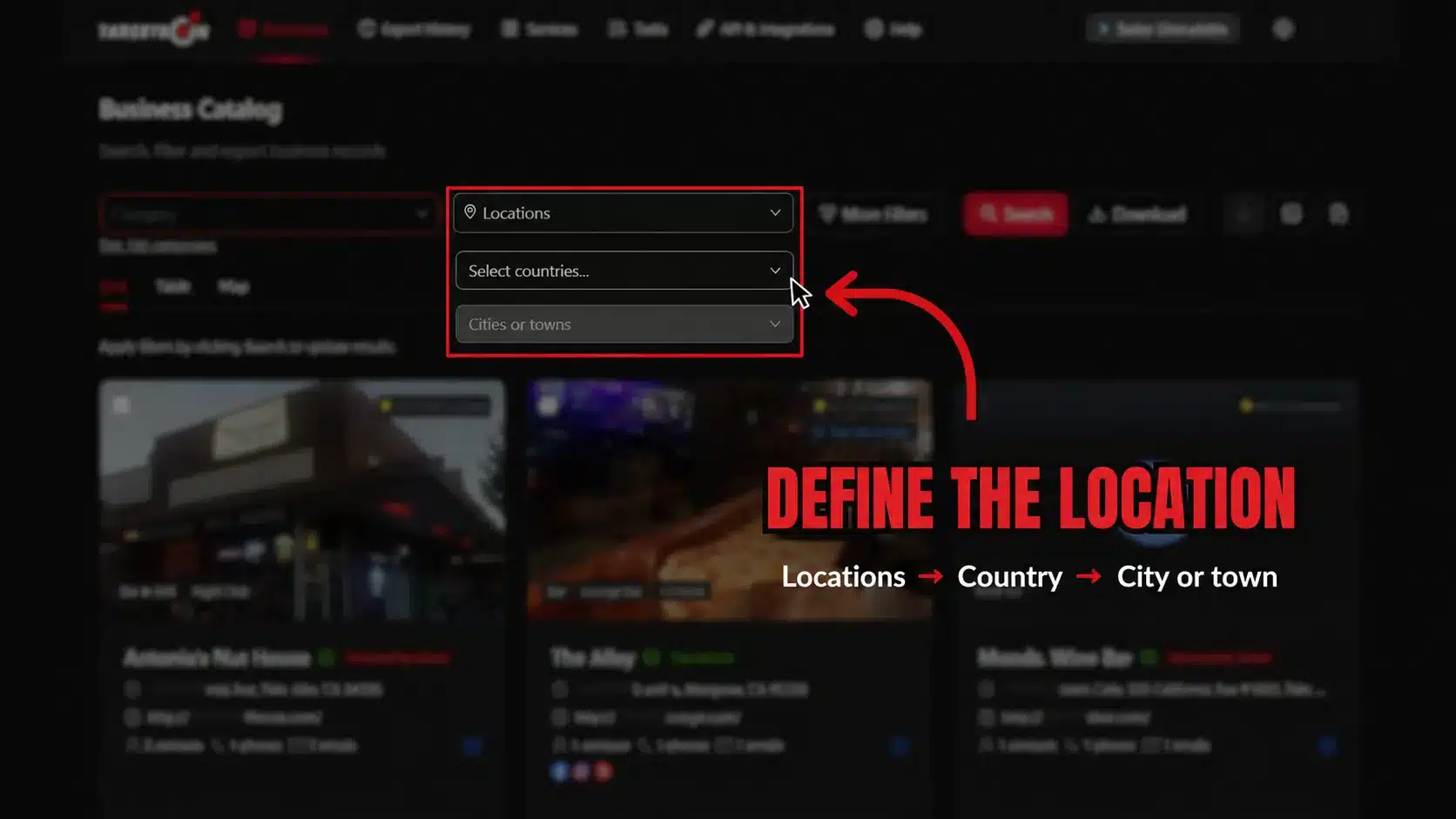
Use the location controls beside the Category field to select the geographic market.

Choose the country first, followed by the relevant city or town when appropriate.

Targetron Business Catalog location controls for selecting a country and city or town.
Narrow the search to the country, city, or town relevant to your campaign.

Step 3: Set the Business Status

Open:

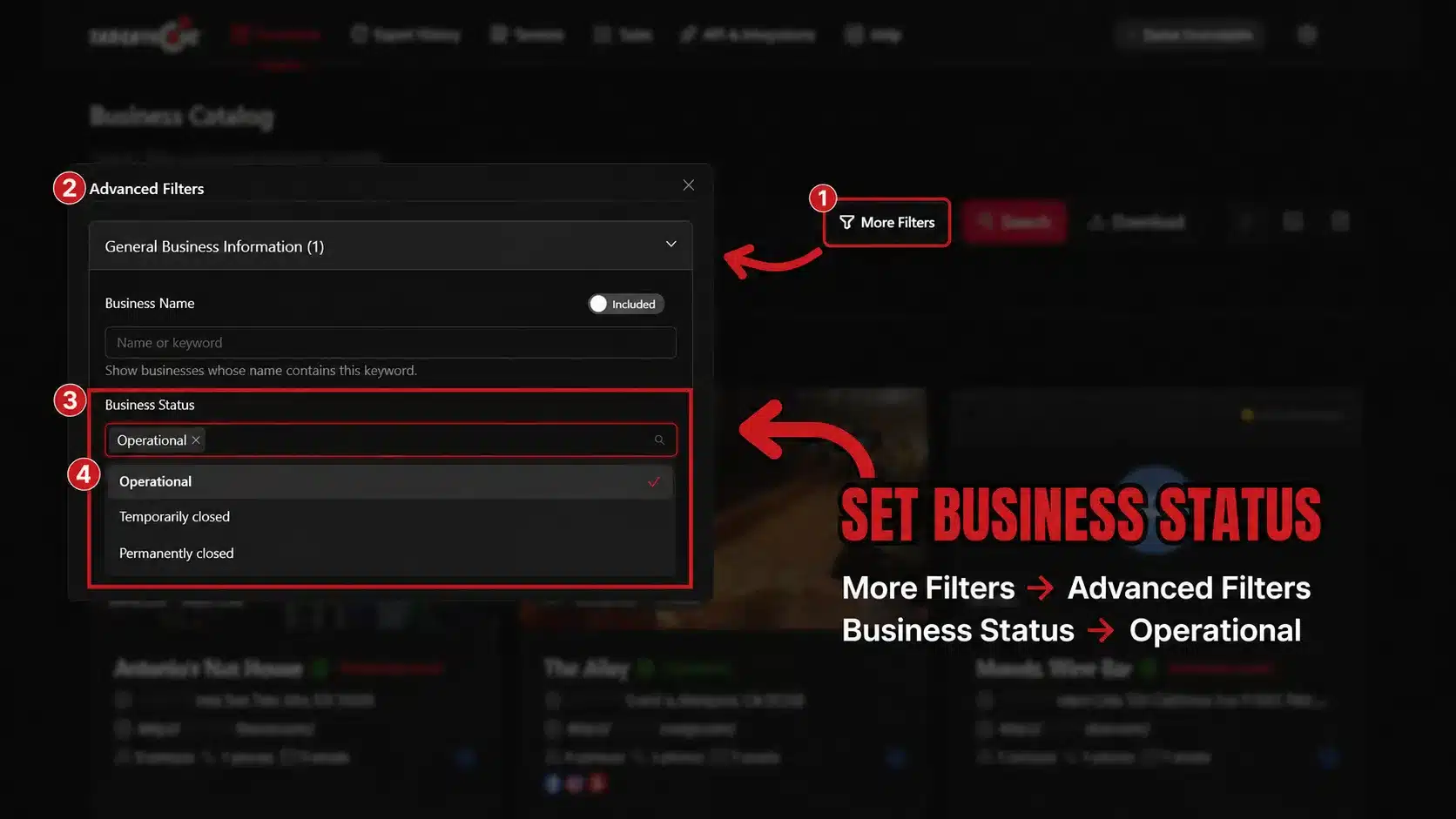
More Filters → Advanced Filters → General Business Information → Business Status

Selecting Operational can help remove businesses listed as temporarily or permanently closed.

Operational status does not mean the company needs SEO or is interested in services.

Targetron Advanced Filters showing Operational selected under Business Status.
Use Business Status to focus research on records currently listed as operational.

Step 4: Filter for Website Information

Open:

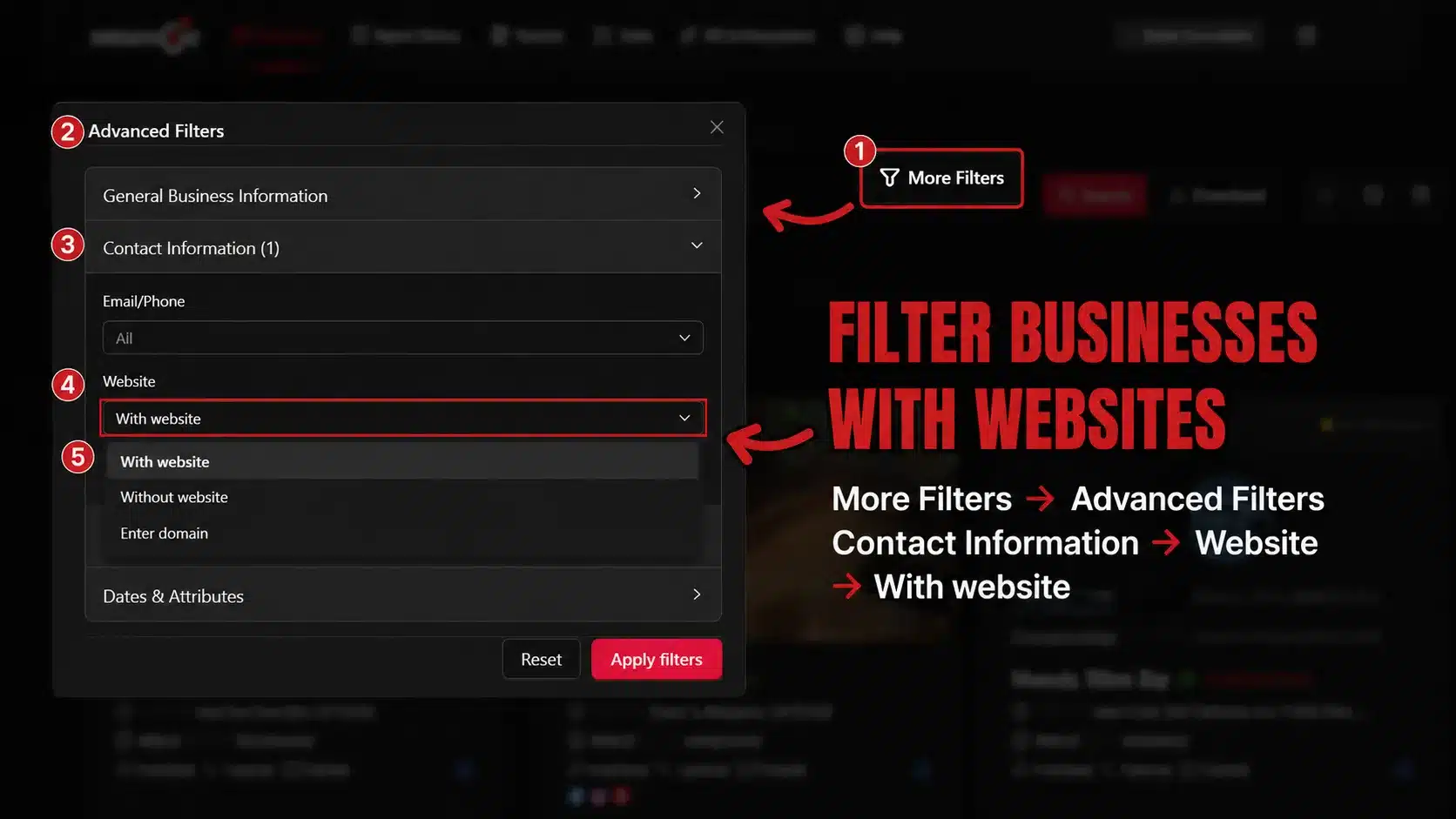
More Filters → Advanced Filters → Contact Information → Website

Use the Website option to narrow the results to records where website information is available.

This does not verify that the listed website is active, maintained, optimized, or suitable for an SEO campaign. 

Targetron Contact Information filters showing the Website option for narrowing local business records.
Filter for records with website information, then verify each listed website separately.

Step 5: Set Rating and Review Criteria

Open:

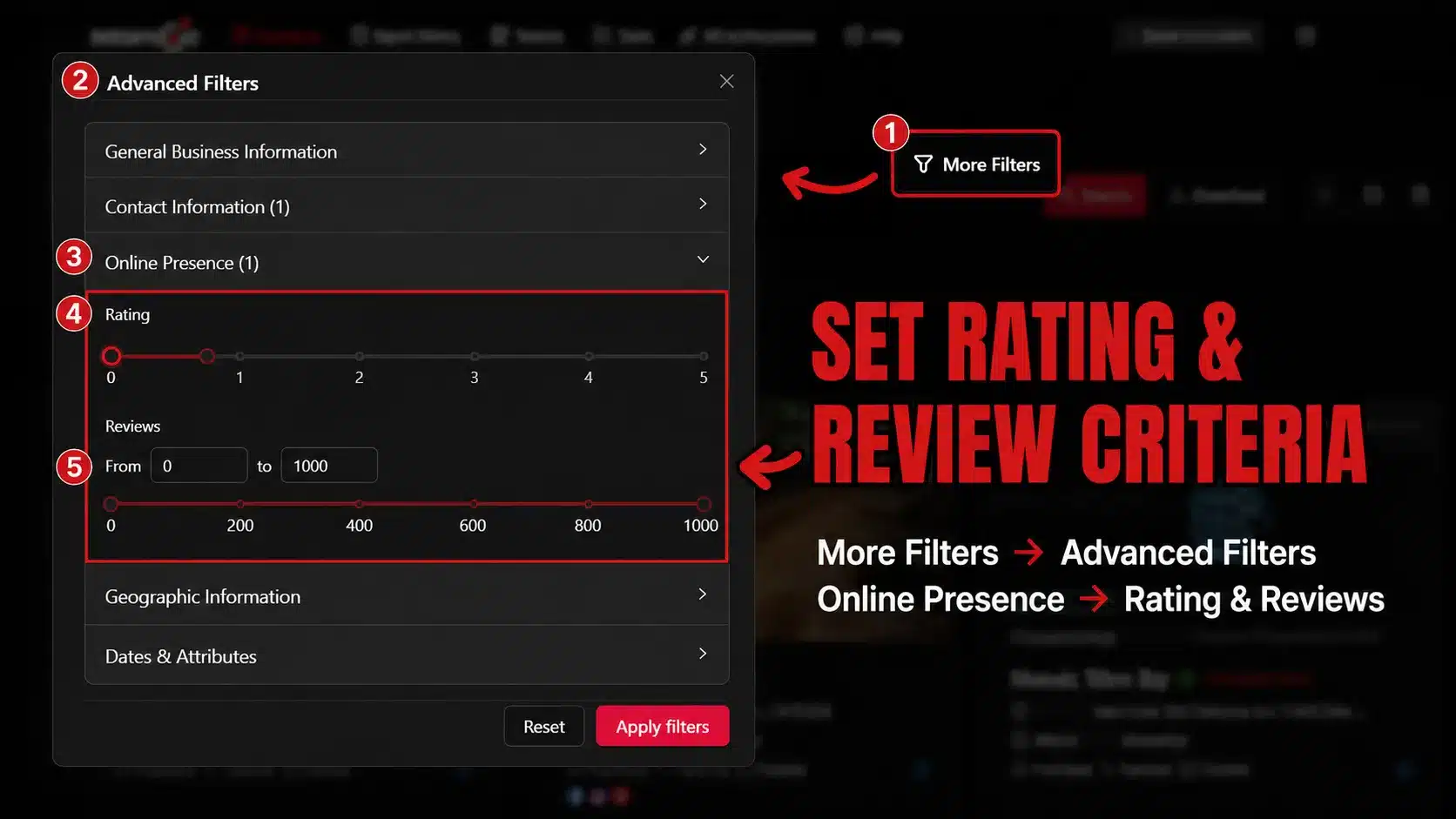
More Filters → Advanced Filters → Online Presence

Use the Rating and Reviews controls according to your research criteria.

Avoid treating a lower rating as evidence that SEO is the underlying problem.

Targetron Online Presence filters showing rating and review controls used for local business research.
Adjust the Rating and Reviews filters to narrow businesses according to your research criteria.

Step 6: Search and Review the Results

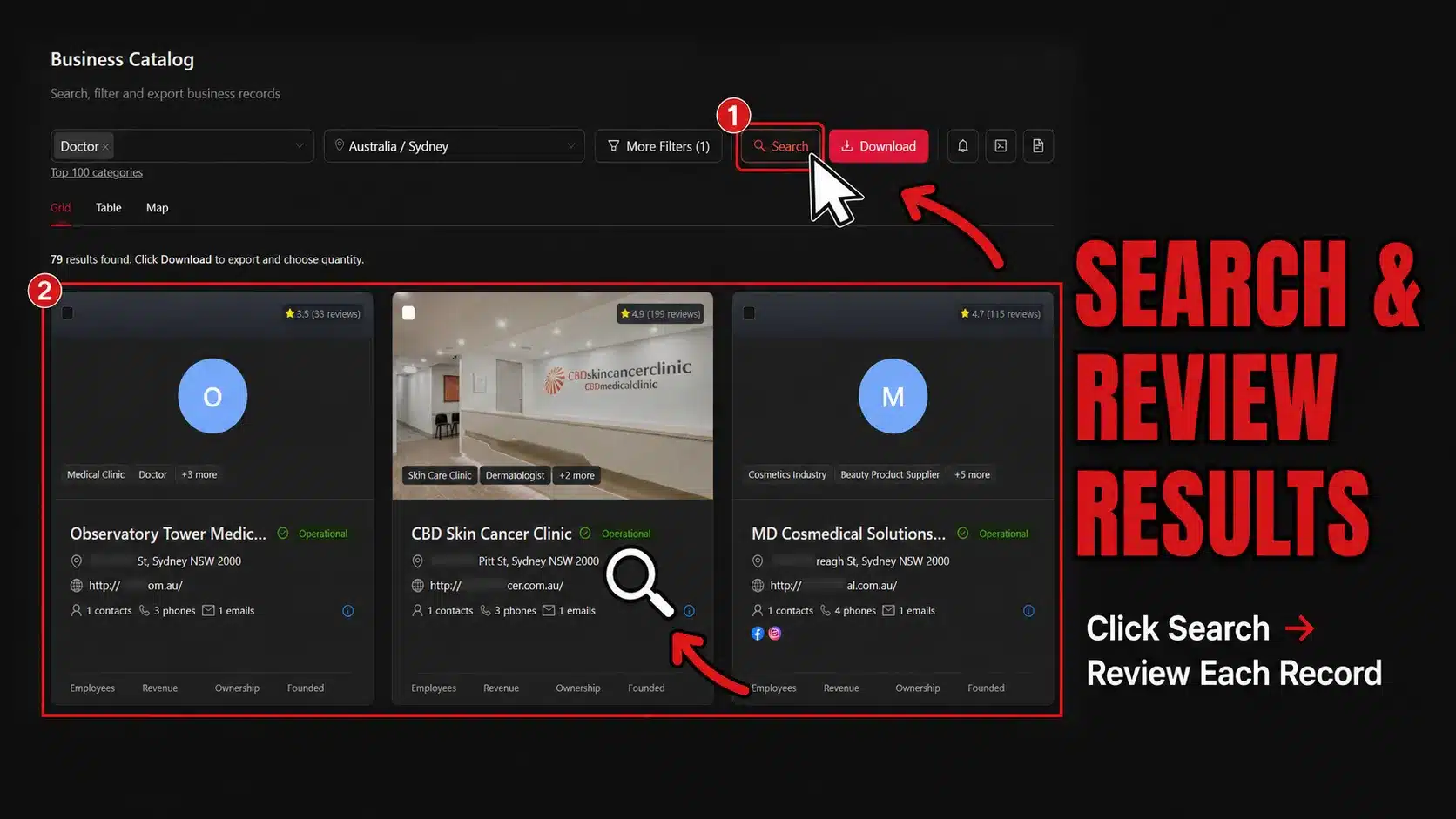
Click Search after applying your criteria.

Targetron will return business records matching the selected settings.

The returned records are research results, not automatically qualified SEO prospects.

Review each record against your own criteria before proceeding.  

Targetron Business Catalog showing business records returned after applying selected research filters.
Review the records returned by your filters before deciding which businesses deserve further research.

Step 7: Export the Records for Further Review

Click Download after reviewing the search results.

The export process can be presented as:

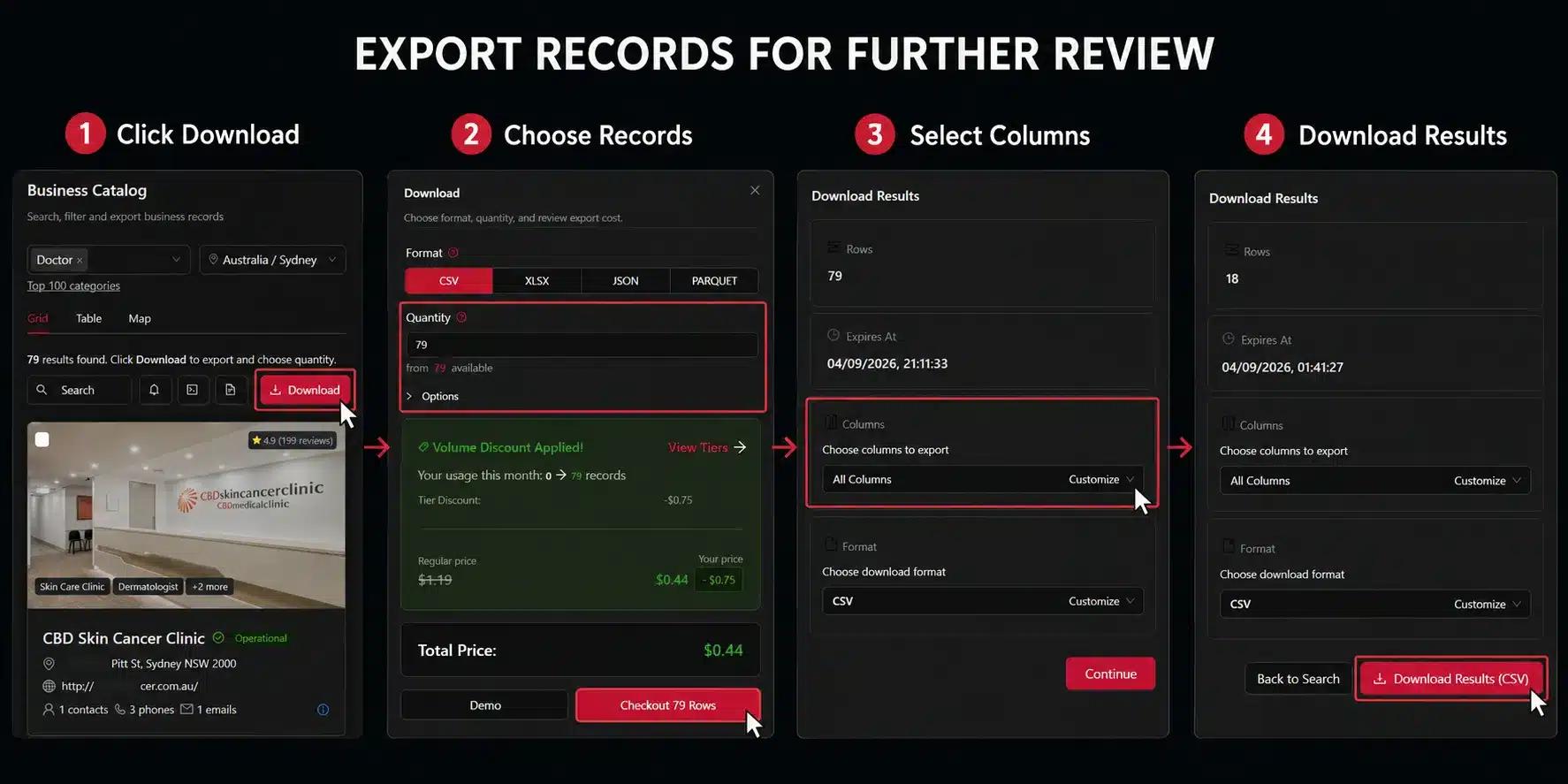
1. Click Download → 2. Choose Records → 3. Select Columns → 4. Download Results

Targetron export workflow showing Download, record selection, column selection, and Download Results steps.
Choose the records, format, and columns needed for further business research before downloading the results.

Want to narrow a large local market before reviewing businesses one by one?

Use Targetron to explore available business data based on criteria relevant to your campaign, then review the resulting records before deciding which businesses deserve further research. 

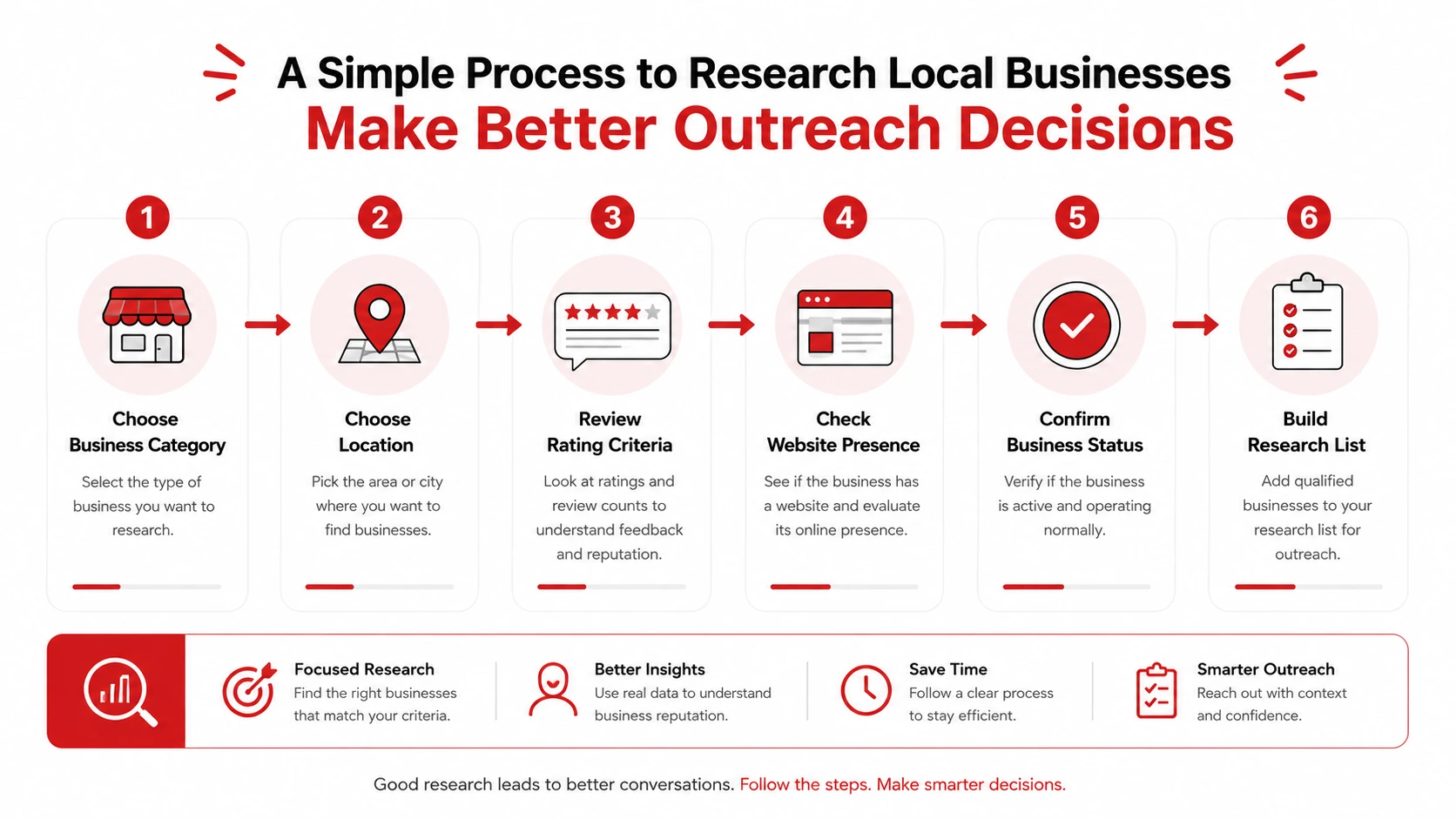
Local SEO prospecting workflow showing category, location, rating criteria, website presence, and business status used to narrow business research.
Narrow the market first, then review the remaining businesses individually.

4. Review the Website Before Deciding Whether the Business Is Relevant

Filtering makes research more manageable, but it cannot replace manual review.

Once a business record contains website information, open the listed website separately.

Verify the Website First

Start with a simple question:

Can you access the listed website?

If the website loads, review information relevant to your campaign.

Depending on the service, you might examine:

  • Important pages
  • Business and location information
  • Service information
  • Contact paths
  • Content structure
  • Technical areas requiring further investigation

Google’s guidance on improving local ranking also highlights the importance of complete and accurate business information for local visibility.

However, Targetron does not determine whether those elements are optimized. That requires separate research.  

Separate Observation From Assumption

For example:

Observation:
Website information is available in the business record.

Unsupported assumption:
The website is actively maintained.

Or:

Observation:
The business has a lower average rating.

Unsupported assumption:
The business needs SEO.

Record what you can actually verify before drawing a conclusion.

If the business remains relevant after website research, the next stage may involve verifying available contact information. Targetron’s guide on how to verify B2B contact information provides a separate process for that stage.

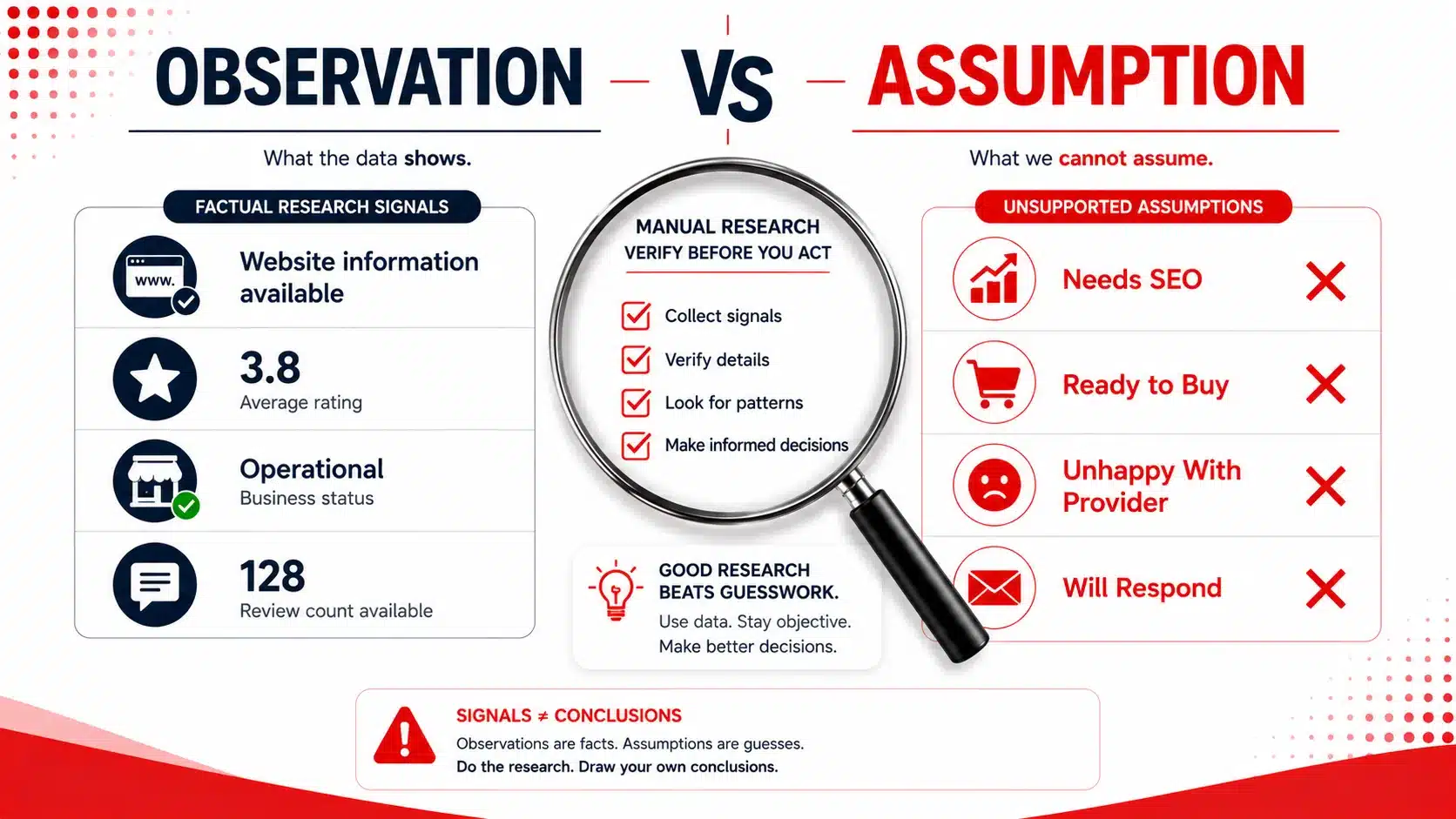
Local SEO research infographic comparing observable business information with unsupported assumptions about SEO need and buying intent.
Keep observable business information separate from assumptions about service need or buying intent.

5. Compare Ratings With the Wider Business Context

Ratings become more useful when viewed alongside other available information.

Consider:

Business A — 3.8 stars from 8 reviews
Business B — 3.8 stars from 250 reviews

The average rating is the same, but the amount of customer feedback behind each rating is very different. 

Review Activity Adds Context

Consider:

  • Average rating
  • Total reviews
  • Recent review activity
  • Business category
  • Location
  • Business status
  • Website information

A rating is one piece of research—not a complete qualification signal. 

Read Reviews Before Drawing Conclusions

When appropriate, manually inspect recent customer feedback.

Lower ratings might relate to:

  • Customer service
  • Pricing
  • Product quality
  • Wait times
  • Delivery
  • Staff interactions
  • Isolated incidents

Many of those issues may have little or nothing to do with SEO.

A safer workflow is:

Filter → Review → Verify → Decide

Not:

Low Rating → Needs SEO 

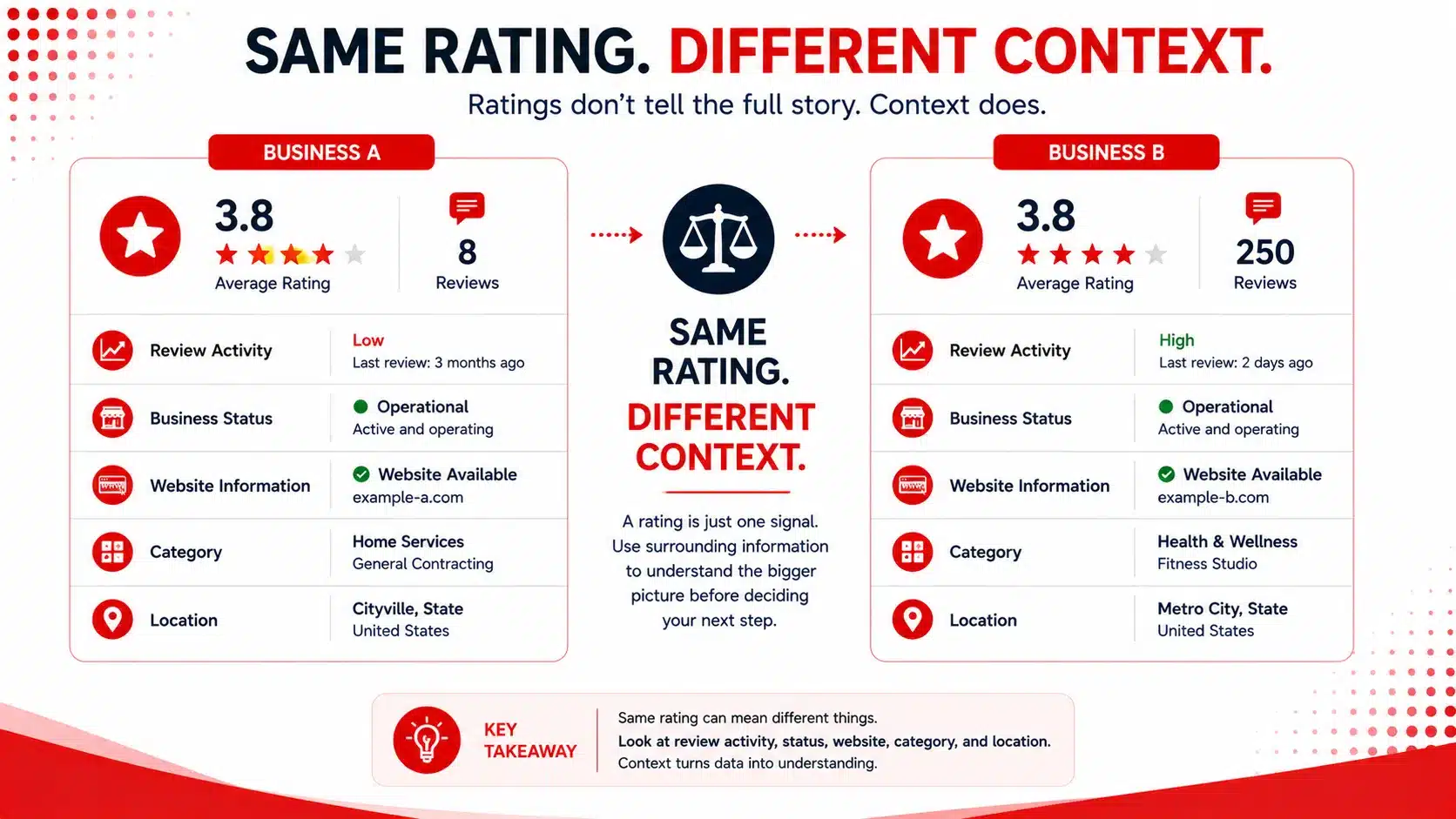
Comparison of two fictional businesses with the same 3.8-star rating but different review counts and surrounding research information.
The same average rating can represent different research contexts when review volume and other business information are considered.

Research the context behind the business record.

Use Targetron to narrow available records, then review websites, ratings, reviews, and other relevant information individually before making an outreach decision. 

6. Turn Search Results Into a Research List, Not a Guaranteed Lead List

After filtering and exporting records, treat the file as a research starting point.

Do not assume every exported business should receive outreach. 

Review Each Record Against Your Criteria

A practical workflow is:

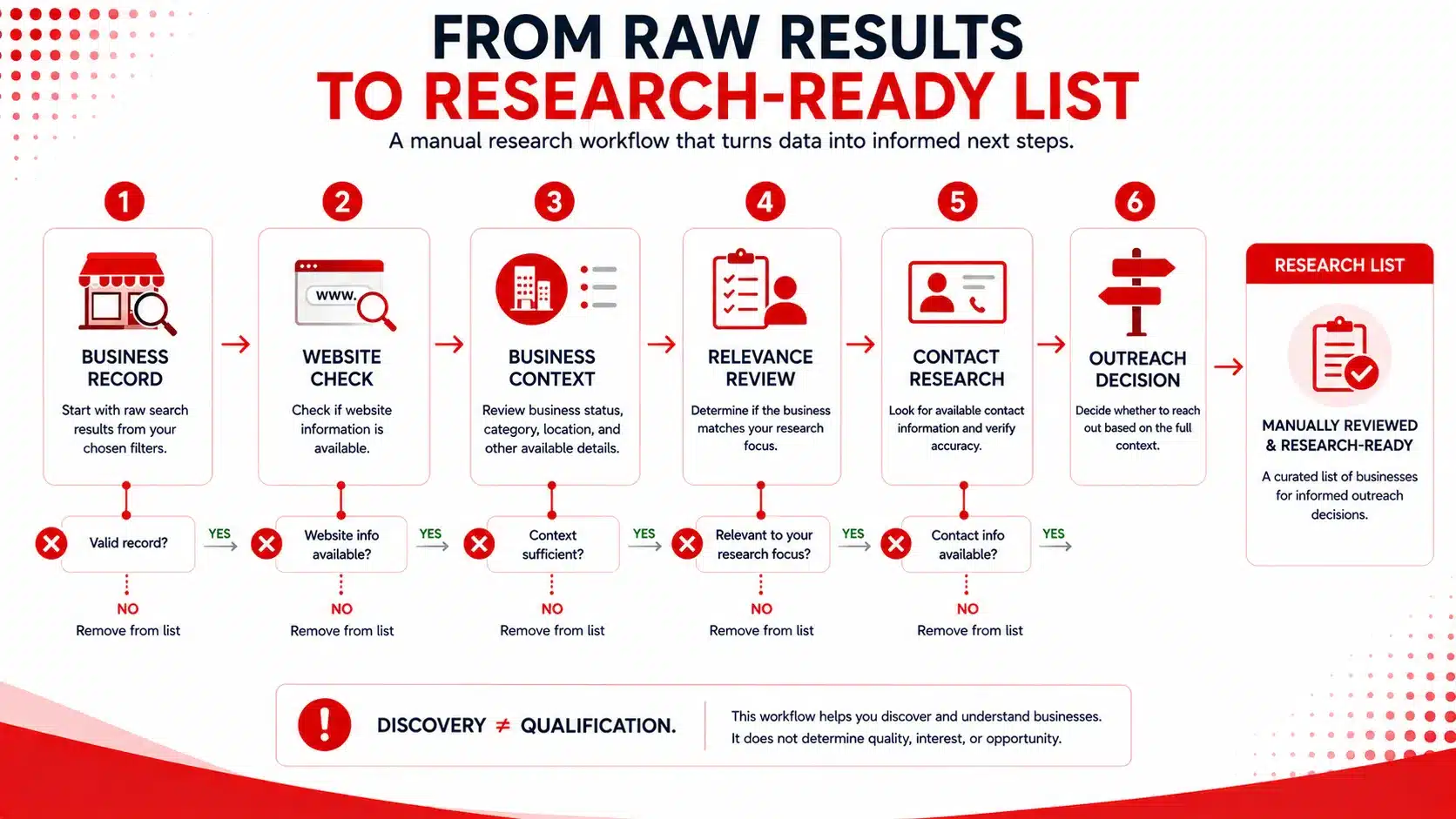
Business Record → Website Check → Business Context → Relevance Review → Contact Research → Outreach Decision

A business may be removed from consideration at any stage.

This keeps discovery separate from qualification. 

Document What You Actually Observe

Instead of:

Needs SEO

Record:

Website information available; website reviewed on [date].

Instead of:

Bad reputation

Record:

Average rating of X from Y reviews at the time of research.

Factual notes make it easier to understand why a business was researched without claiming knowledge of its internal needs.

For campaigns that require additional information after initial discovery, Targetron’s B2B local business data resources provide additional context around available business information. 

Business research workflow moving from a business record through website review, context, relevance, contact research, and an outreach decision.
Treat search results as research records and verify relevance before deciding whether outreach is appropriate.

Ready to organize your local business research?

Use Targetron’s Business Catalog to narrow available records based on criteria relevant to your campaign, then review each business before deciding what comes next.

FAQ

Most frequent questions and answers

No. Ratings can reflect many parts of the customer experience. A lower rating can help narrow research, but it does not prove that SEO is the problem. Use other business signals and manual review before deciding whether a company is relevant.

For a broader research framework, see lead scoring for small businesses.

Website information in a business record should not be treated as confirmation that the website is currently accessible or maintained. Open and review the listed website separately before using it as part of your research. 

No. Operational status is a research filter. It does not establish service need, budget, buying intent, or interest in outreach.

You can learn more about separating business data from qualification in how to find B2B leads that match your ICP

Review count adds context to an average rating. A 3.8 rating based on five reviews represents a different research situation from the same rating based on hundreds of reviews.

No. Treat the results as research records rather than automatically qualified prospects. Review the business, website information, and campaign relevance before deciding whether outreach makes sense.

If you move to contact research, use a separate B2B contact verification process before outreach.

Targetron can help agencies narrow available business records using category, location, business status, website information, ratings, reviews, and other available criteria. The agency still reviews the resulting records and decides which businesses deserve further investigation. 
Written by