Arrange a Free Consultation.
Get Free Expert Advice
Chat with Paul via WhatsApp now! Get a chance to receive free leads instantly.
Finding B2B contacts by job title is easier when you start with the right companies first. If you only search for “CEO,” “CFO,” “Founder,” or “Operations Manager,” you may collect people with the right title but the wrong company fit.
A better process is to define the role, filter companies by category, location, website presence, and contact availability, then verify the person before outreach. This guide shows how to build a focused prospect list using a simple workflow instead of chasing random names from outdated databases.
To find B2B contacts by job title, define the role you want to reach, list common title variations, and filter companies by industry, category, location, and contact availability. Then find the matching decision-maker, verify their email or phone number, and prioritize the contacts that best fit your offer before outreach.
A similar company-first process works here: Source → Signal → Shortlist → Outreach. Start by choosing the companies you want to research. Then check signals such as category, location, website presence, reviews, ratings, and contact availability. Shortlist the companies that match your offer before searching for the person most likely to handle the buying decision.
For the full version of this workflow, see the guide on how to find B2B leads without buying expensive lists.

B2B contacts are people inside a company who may be involved in buying, using, or approving a product or service. These contacts can include business owners, founders, managers, directors, department heads, and executives.
When you find B2B contacts by job title, you are not just looking for any email address. You are looking for people whose role matches the problem your offer solves. For example, a payroll tool may need HR managers, while a cleaning service may need restaurant owners, facility managers, or operations managers.
Job title matters because it helps you avoid sending outreach to the wrong person. However, a job title alone is not enough. A CFO at a large enterprise, a finance manager at a local company, and a business owner at a small firm may all handle different buying decisions.
A good contact list separates three types of people: decision-makers who can approve the purchase, influencers who can recommend or block it, and users who may feel the problem daily. To find B2B contacts effectively, you need to match the job title with the right company type and buying role.
Many teams make the mistake of searching for job titles before checking whether the company is a good fit. They search for CEOs, founders, CFOs, or operations managers, then end up with a long list of people who may have the right title but work at companies that do not match the offer.
A better approach is to build the company list first. Start with the type of business you want to reach, then narrow the list by location, category, website presence, contact availability, and other business signals. This helps you avoid wasting time on contacts who are unlikely to respond or buy.
For example, if you sell software to local service businesses, you should not only search for “owner” or “operations manager.” You first need to find the right service companies in the right locations. After that, you can look for the person most likely to handle the buying decision.
This is where a company-first workflow is useful. It helps you separate good-fit accounts from random contacts. Once the company list is focused, finding the right job title becomes easier because you already know which businesses are worth researching.
Targetron can support this stage by helping you filter businesses by category, location, and contact availability before you start outreach. Instead of building a list from random names, you can start with companies that better match your target market.
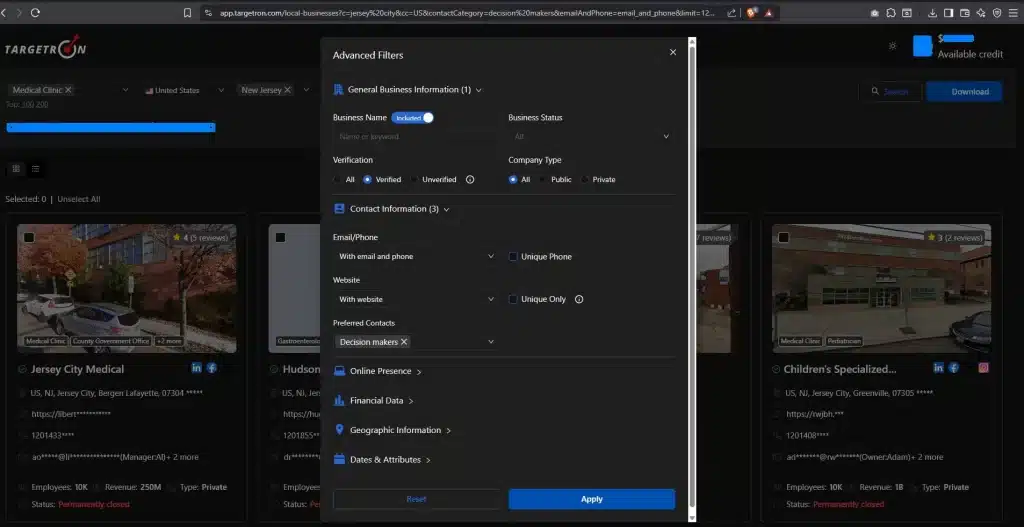

Targetron helps you move from manual research to a usable prospect list faster. Find local businesses, review public signals, and shortlist better-fit prospects without starting from a random spreadsheet.
Finding B2B contacts by job title works best when you follow a clear process. Use this workflow to move from a broad target role to a focused contact list.
| Step | What to Do | Example |
|---|---|---|
| Choose the type of person connected to your offer. | Example: CFO, Operations Manager, Founder | |
| List similar job titles so you do not miss relevant contacts. | Example: Finance Director, Controller, Business Owner | |
| Decide which businesses are most likely to need your offer. | Example: Cleaning companies, clinics, agencies, restaurants | |
| Narrow the list based on where and what you sell. | Example: Restaurants in New York, dental clinics in Texas | |
| Look for businesses with websites, emails, phone numbers, or social links. | Example: Website available, phone listed, email found | |
| Search company pages, LinkedIn, directories, or contact tools. | Example: Owner, General Manager, Head of Operations | |
| Confirm the person still works there and the contact details are usable. | Example: Check LinkedIn, company website, email status | |
| Focus first on contacts inside companies that match your offer. | Example: High-fit company + correct role + valid contact |
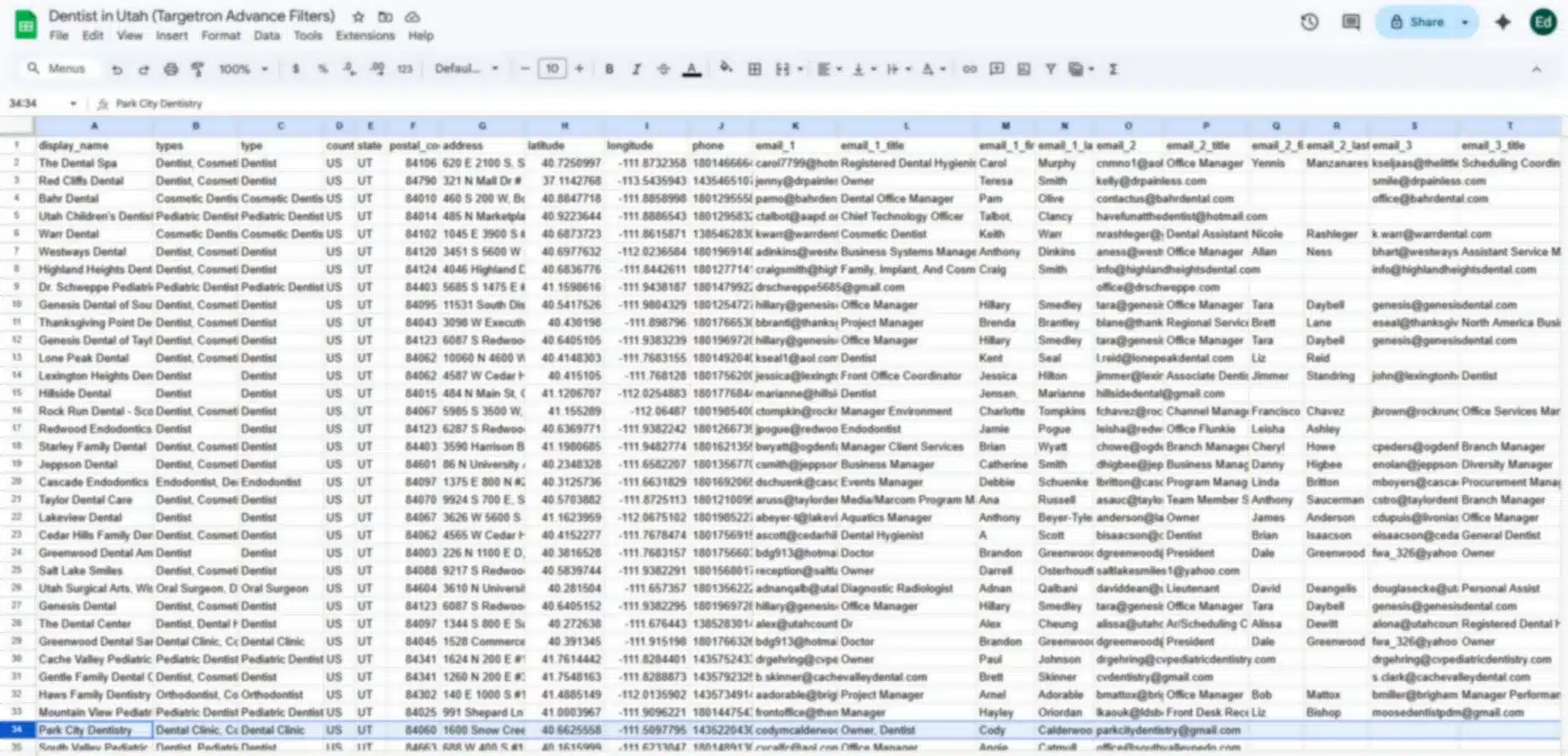
If you sell a service to dental clinics, do not start by searching only for “Owner” or “Practice Manager.” Start by finding dental clinics in your target location. Then check which clinics have websites, phone numbers, email addresses, and preferred decision-maker contacts available.
For example, you can filter dental clinics in Utah, review basic business details, and shortlist clinics that have enough contact information for outreach. After that, look for the owner, practice manager, office manager, or general manager connected to each clinic.
This approach keeps your list focused. You are not only collecting names from a broad contact database. You are building a contact list based on company fit, role fit, and outreach readiness.
There is no single best method for finding business contacts by job title. The right method depends on whether you need to find names, check company fit, verify contact details, or build a larger prospect list.
| Method | Best For | Limitation |
|---|---|---|
| LinkedIn Search | Finding names, job titles, and current roles. | Manual research can take time. |
| LinkedIn Sales Navigator | Filtering people by role, seniority, company, and location. | Requires a paid account. |
| Google Search Operators | Finding public profiles, team pages, and company mentions. | Slow for large prospect lists. |
| Company Websites | Checking owners, leadership pages, and department contacts. | Many small businesses do not list full teams. |
| B2B Contact Databases | Finding emails, phone numbers, and company details faster. | Data can become outdated. |
| Targetron-Style Company Filtering | Building a focused company list before searching for people. | Person-level details may still need checking. |
If you need more than a small manual list, a B2B sales leads database with emails and phones can help you find company and contact details faster. Just remember to check company fit, role fit, and contact accuracy before outreach.
Use job title variations when building your contact list. One buying role can appear under several titles depending on the company size, industry, and team structure.
A B2B local leads directory can help you start with a focused company list before checking which owner, manager, or department lead fits your outreach goal.
For smaller companies, the best contact is often not a C-level executive. The owner, founder, branch manager, or general manager may handle the buying decision. The goal is to match the buying role, not just the exact job title.
Building a B2B contact list is not only about finding names and email addresses. The quality of the list depends on how well each contact matches your target role, company type, and outreach goal.
Here are common mistakes to avoid:
Before outreach, check three things: company fit, role fit, and contact accuracy. The company should match your target category, location, and offer. The person’s job title should match the buying role. The email, phone number, or profile should also look current enough to use.
The goal is not to build the biggest list. The goal is to build a contact list that is accurate, focused, and ready for outreach. When you match the right job title with the right company type, your team spends less time sorting bad leads and more time contacting people who may actually need your offer.
Most frequent questions and answers
To find B2B contacts by job title, start by defining the role you want to reach, then list similar job titles. Next, filter companies by industry, category, location, and contact availability. After that, find the matching person, verify their email address or phone number, and prioritize contacts inside companies that fit your offer.
To find decision-makers at a company, first identify who would approve, recommend, or use your product or service. For smaller businesses, this may be the owner, founder, or general manager. For larger companies, it may be a director, department head, VP, CFO, CTO, or operations leader.
Yes, you can find some business contacts for free using company websites, LinkedIn profiles, Google search, business directories, and public social profiles. Free methods work well for small lists, but they can take time. For larger prospect lists, paid tools can help you filter companies and check contact availability faster.
Start by finding companies that match your target market, then search for people with the job title you need. You can check company websites, LinkedIn, directories, or contact databases. Before outreach, verify that the person still works at the company and that the email address is usable.
Avoid outdated B2B contact lists by checking company status, website activity, contact availability, and role accuracy before outreach. Do not rely only on old spreadsheets or bought lists. People change jobs, businesses close, and contact details change, so refresh your list regularly and verify key contacts before sending campaigns.