How to Divide B2B Lead Lists by Territory Without Duplicating Accounts
Table of Contents
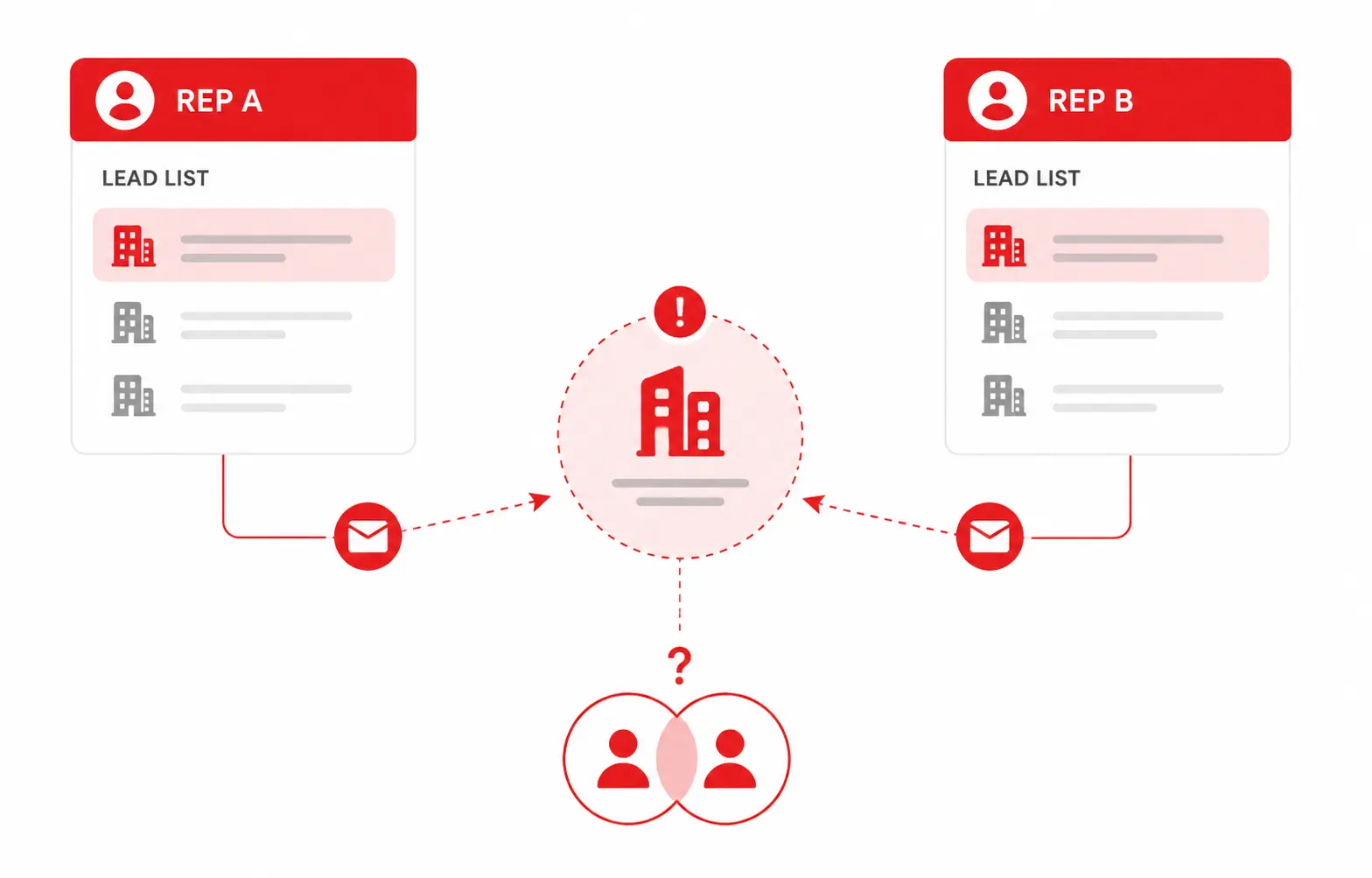
Managing B2B lead lists across multiple territories can quickly create duplicate accounts. The same company may appear in different lists, leaving two sales representatives responsible for the same prospect.
To divide B2B lead lists by territory without creating these overlaps, start with one master company list. Remove duplicate accounts, define clear territory rules, and assign one owner to each company before outreach begins.
This gives your sales team cleaner data, clearer account ownership, and fewer problems when the lists reach your CRM.
Quick Answer: How to Divide B2B Lead Lists by Territory
- Build one master company list.
- Remove duplicate companies using website domains.
- Define clear territory rules.
- Assign one owner to each company.
- Keep all contacts under the correct account.
- Export the cleaned B2B lead lists to your CRM.
Why Duplicate Accounts Hurt B2B Sales Teams
Duplicate accounts can create problems before a sales representative even starts outreach. If two people contact the same company, the prospect may receive conflicting messages from the same business.
For B2B sales teams, this can lead to:
- Duplicate outreach
- Unclear account ownership
- Messy CRM records
- Wasted prospecting time
- Poor sales reporting
The problem often starts when lists are divided before company records are reviewed.
For example, one representative might receive a company from a regional list while another gets the same company from a separate industry list.
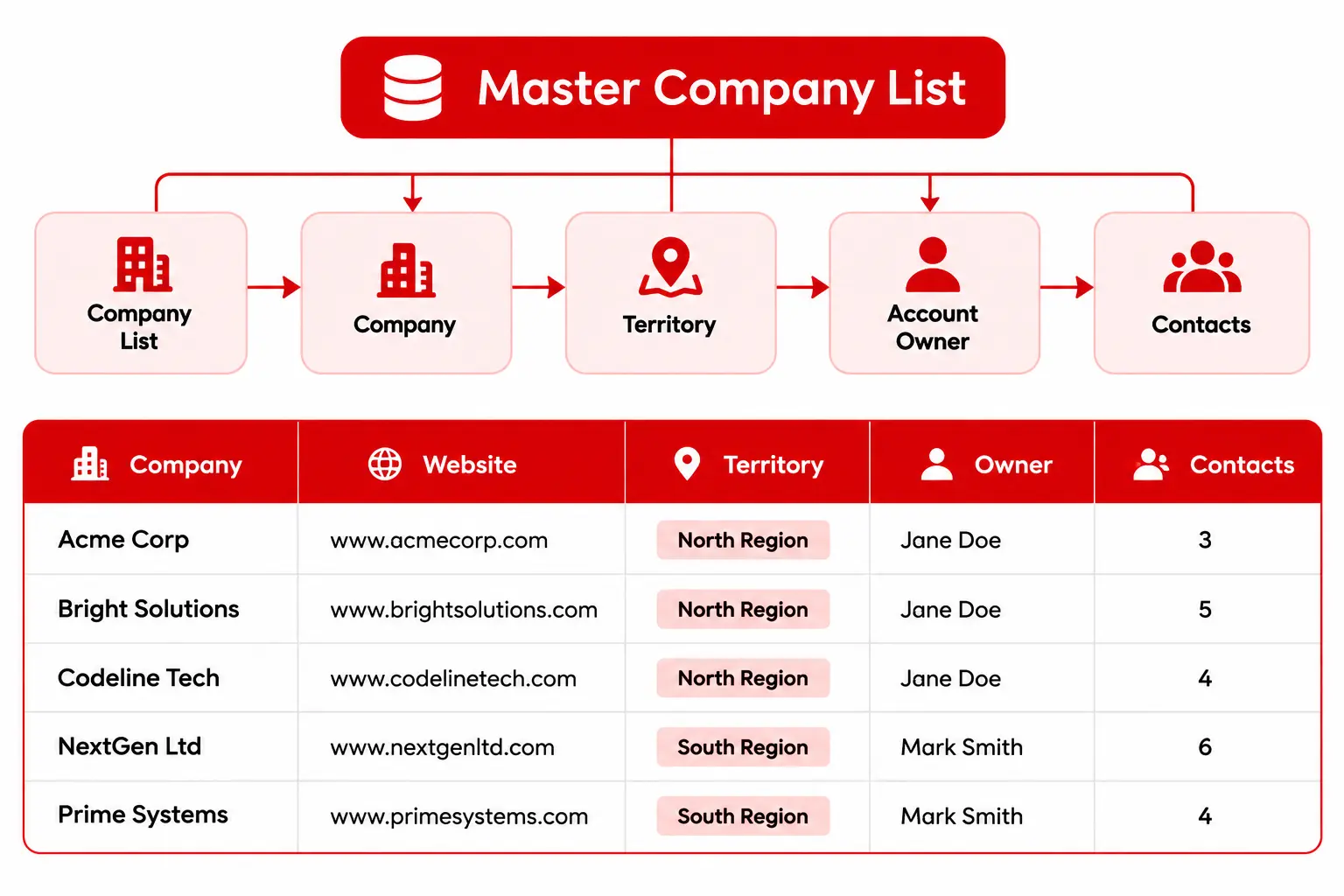
Instead of assigning contacts first, assign the company first.
Every account should have:
- One company record
- One territory
- One account owner
- Multiple contacts if needed
This gives your B2B lead lists a clear structure before outreach begins.
Build One Master Company List Before Splitting Territories
The company should appear once, while its contacts remain connected to that account.
| Company | Website | Territory | Owner | Contacts |
|---|---|---|---|---|
| ABC Manufacturing | abcmfg.com | North | Sarah | 4 |
| BrightTech Solutions | brighttech.com | West | James | 3 |
| NorthStar Logistics | northstar.com | East | Maria | 5 |
This company-first approach makes B2B lead management easier because territory ownership is decided at the account level.
For example:
ABC Manufacturing
        ↓
North Territory
        ↓
Sarah — Account Owner
        ↓
All ABC Manufacturing Contacts
Instead of splitting contacts between representatives, the company stays under one owner.
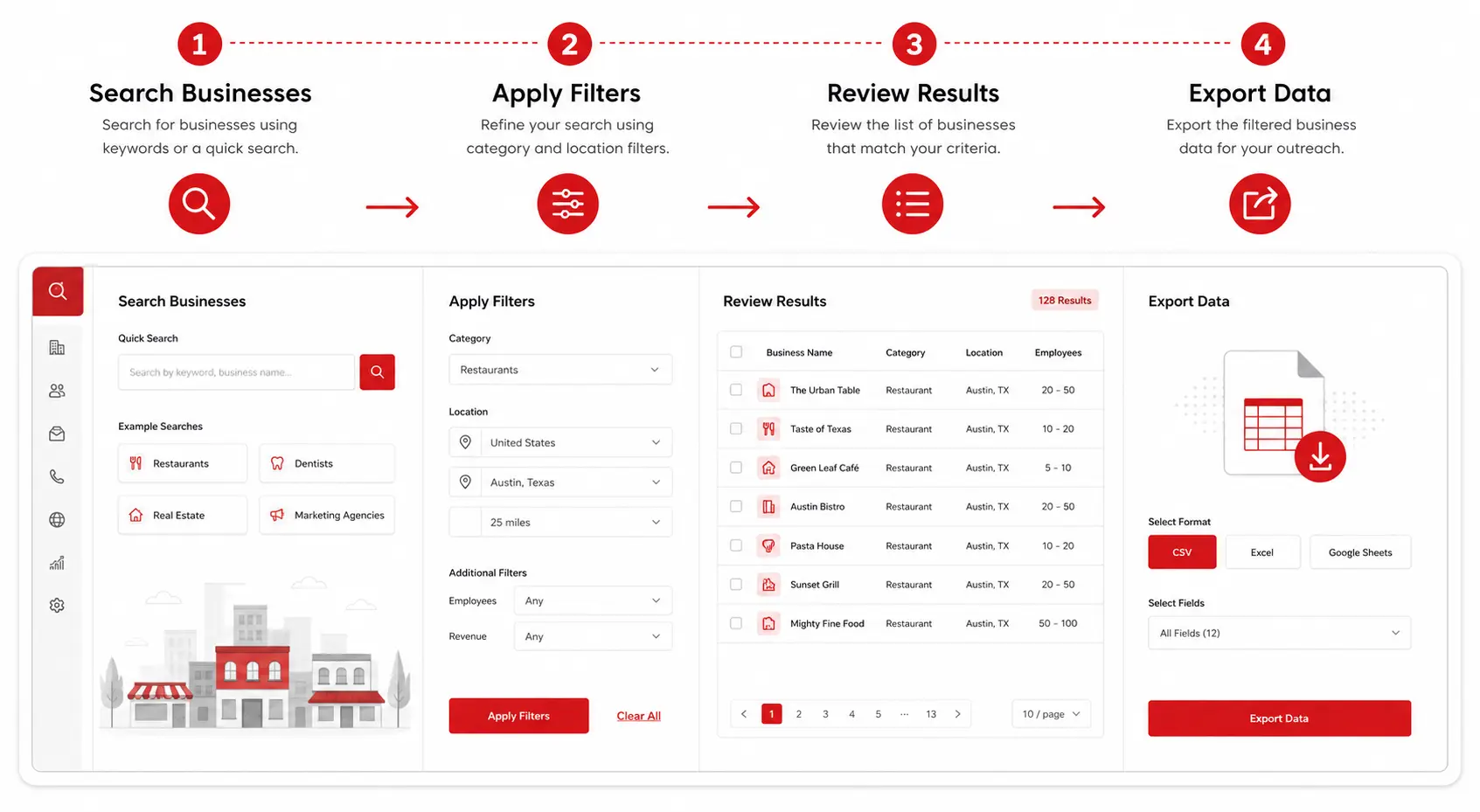
If you’re still building your company list, learn how to use a B2B local leads directory to search and filter businesses before exporting your data. Targetron’s directory supports searches by industry, category, city, ZIP code, state, and country, along with advanced filters and export options.
Need to build your company list?
Use Targetron to find businesses by industry, location, and other criteria before organizing your B2B lead lists.
Use Company Domains and Territory Rules to Prevent Duplicate Accounts
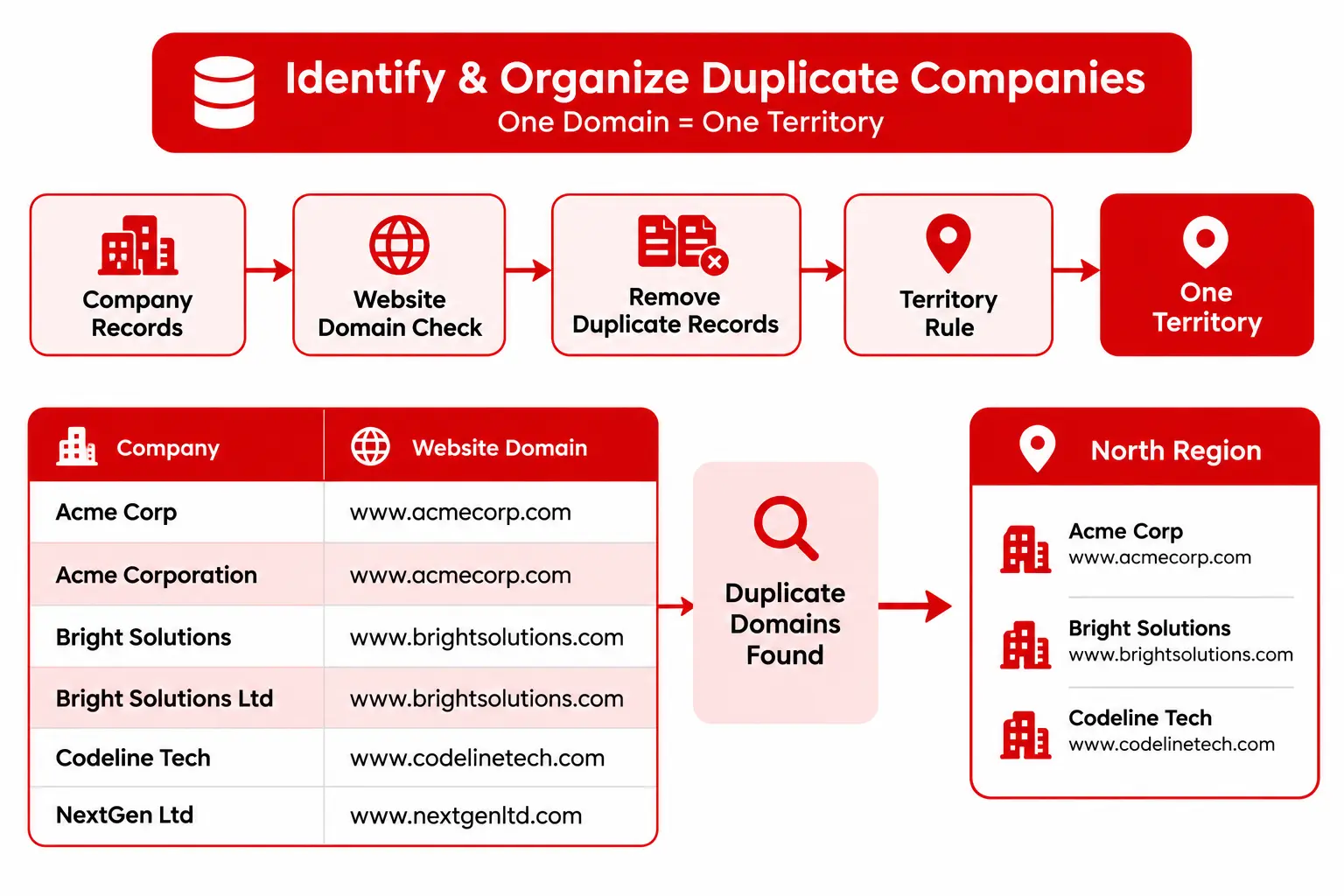
Once your B2B company list is ready, check for duplicate accounts before dividing it between territories.
Company names can appear differently across data sources. For example:
| Company Name | Website |
|---|---|
| ABC Manufacturing | abcmfg.com |
| ABC Manufacturing Inc. | abcmfg.com |
| ABC MFG | abcmfg.com |
These records may represent the same company. Using the website domain as a matching field makes it easier to identify duplicates before they reach your CRM.
After cleaning the list, define one consistent territory rule for your B2B lead lists.
Common options include:
| Territory Rule | Example |
|---|---|
| Geography | State, city, or region |
| Industry | Healthcare, SaaS, manufacturing |
| Company Size | SMB, mid-market, enterprise |
| Named Accounts | Specific target companies |
Choose the rule that matches how your B2B sales team operates and apply it consistently.
The goal: one company, one territory, one owner.
Assign One Owner Before Exporting to Your CRM
After removing duplicates and assigning territories, give every company one account owner.
Do this before exporting your B2B lead lists to the CRM.
A simple workflow is:
Before importing your B2B data, check that:
- Company appears only once
- Website domain is identified
- Territory is assigned
- Account owner is assigned
- Contacts belong to the correct company
- No territory overlaps remain
This prevents your CRM from becoming the place where duplicate accounts and ownership problems are discovered.
Build your next B2B lead list with Targetron.
Search businesses, apply filters, and export the data for your sales workflow.
How Targetron Helps Build B2B Lead Lists
Building B2B lead lists from different sources can make territory planning harder. Company information may be spread across directories, spreadsheets, and other research sources.
Targetron can help with the lead-building stage by letting you find businesses by category and location, apply filters, and export business data for your sales workflow.
A practical workflow is:
Target Market
      ↓
Find Businesses
      ↓
Filter Results
      ↓
Export Business Data
      ↓
Clean Duplicate Records
      ↓
Assign Territories
      ↓
Assign Account Owners
The first four steps happen during the lead-building process. Cleaning duplicates, assigning territories, and assigning account owners are part of your sales workflow after the data is exported.
If you need to find businesses based on specific criteria, you can search and filter local businesses before building your final B2B lead list.
Keep B2B Lead Lists Clean as Your Team Grows
Dividing B2B lead lists by territory is easier when every company has one clear territory and account owner.
Start with one master company list, remove duplicate records, apply consistent territory rules, and assign ownership before outreach.
As your sales team grows, review your B2B lead lists regularly to catch duplicate accounts and territory overlaps.
The goal is simple: one company, one territory, one owner.
Build your next B2B lead list with Targetron.
Search businesses, apply filters, and export the data for your sales workflow.
FAQ
Most frequent questions and answers
Start with one master list, remove duplicate companies, define territory rules, and assign one owner to each account.
Use a consistent company identifier, such as the business website domain, to identify duplicate records before assigning territories.
Assign the territory to the company first. Keep its contacts under the same account and owner.
Clean the company data, remove duplicates, assign territories, and set one account owner before importing the list into your CRM.
Yes. Targetron can help you find businesses by category and location, filter results, and export business data for your sales workflow.
Yes. Targetron lets you find businesses without websites using advanced search filters. You can narrow the results by industry and location, then export available business details such as company names, phone numbers, addresses, and social profiles.
This is especially useful for web design, local SEO, and marketing agencies looking for businesses that may need help building or improving their online presence. Learn more in our guide to finding businesses without websites.
 Written by
Dan Dades
Written by
Dan Dades